The Swarms research team has released a new paper: "AgentRearrange: Simplifying Multi-Agent Workflow Orchestration", by Kye Gomez, Steve-Dusty, Adi Chaudhary, Ayaan Gazali, Shryuk Grandhi, Wyatt Stanke, Taddy, Vidith Salla, NingLin Liu and Nicolas Nahas. It describes the workflow primitive of the open-source Swarms framework, and the idea fits in one line:
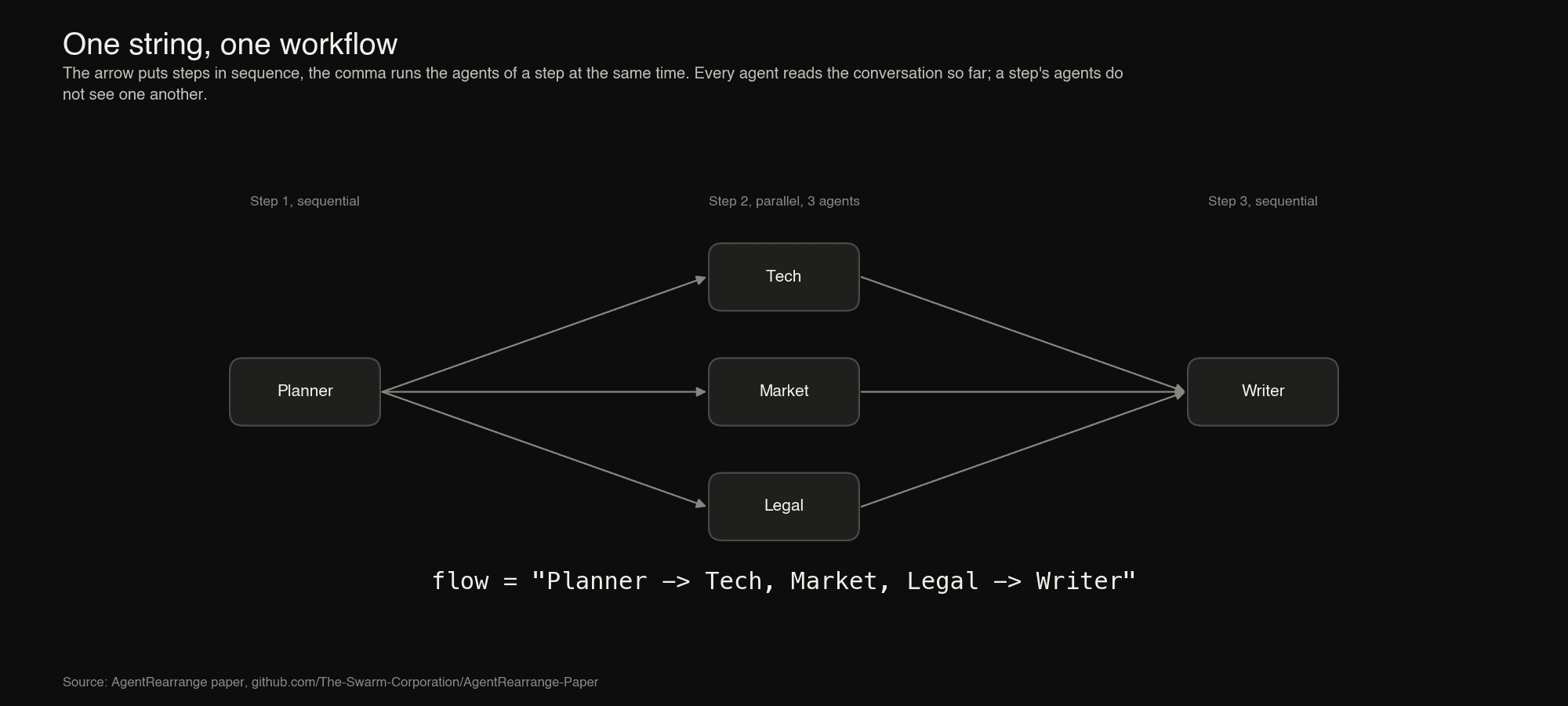
Planner -> Tech, Market, Legal -> Writer
That string is a complete five-agent workflow. The arrow puts steps in sequence, the comma runs the agents of a step at the same time, and the agents themselves are ordinary objects defined once. Rearranging the team is editing the string.
The paper makes four contributions: a precise grammar and execution semantics for the flow language, including nested workflows; a side-by-side comparison of the code needed to express the same workflow in six frameworks; an open benchmark suite that runs four workflow shapes through each framework at 8 to 512 agents with a stubbed model; and a plain account of what the design gives up.
The headline numbers: on wide workflows, AgentRearrange adds 37 to 42 ms of orchestration overhead at 512 agents, which is 2.5x less than LangGraph with function nodes, about 9x less than LangGraph with agent nodes, 3x less than LangChain, and more than two orders of magnitude less than AutoGen GraphFlow. It has the lowest peak memory of any framework measured on those shapes, and it changes topology 9x to about 100x faster than rebuilding and recompiling a LangGraph graph. It is also slower than frameworks that do constant work per step on chains of hundreds of agents, and the paper says why.
This article walks through the paper, then shows how to use AgentRearrange in the Swarms framework and through the Swarms API.
Why a String
A single language-model agent is a loop around a model call. A multi-agent system is a set of such loops plus a rule for who runs when and who sees whose output. Most of the engineering effort in a multi-agent application goes into that second part, and it is also where such systems tend to break: a study of failures in multi-agent systems attributes a large share of them to how the system is specified and how agents are coordinated, rather than to the individual agents.
The dominant way to express the rule is a graph API. LangGraph builds a StateGraph from add_node and add_edge calls and compiles it. AutoGen offers a DiGraphBuilder that feeds a GraphFlow team. CrewAI attaches agents to an ordered list of tasks. Agno nests Step and Parallel objects inside a Workflow. These APIs are general, and generality has a price that is paid on every workflow, including the simple ones.
The paper's starting observation is that the recurring structural patterns in practice, a chain in which each step refines the last, a fan-out in which several agents work on the same input at once, and a fan-out followed by a step that merges the results, are all compositions of two operations, then and together. Two operations fit in a string. The name and the notation follow einsum and einops, which showed that a compact string can replace a family of tensor-manipulation calls without losing clarity.
The Flow Language
Grammar
A flow is a non-empty sequence of steps separated by ->. A step is a non-empty, comma-separated list of names. A name refers to a member registered with the workflow: an agent by its agent_name, or another workflow by its name. Whitespace around names is ignored.
flow  ::=  step ( "->" step )*
step  ::=  name ( "," name )*
name  ::=  the name of a registered agent or nested workflow
A flow with N names in L steps is a string with N names, L minus 1 arrows and N minus L commas. Three special cases are worth naming: a flow with no commas is a chain, a flow with no arrows is a pure fan-out, and a flow whose steps all have several names is the layered topology of Mixture-of-Agents.
Semantics
Steps run in order. A step with one name runs that member. A step with several names runs all of them at once and completes when the last one finishes. Every member reads the conversation so far and appends its answer to it, so a member in step k sees the task and every answer from steps 1 to k minus 1. Members of the same step do not see one another's answers, and their answers are recorded in the order they are written in the flow, not the order they finish, so the transcript is deterministic. Setting max_loops to m runs the whole flow m times over the growing conversation.
In graph terms, consecutive steps are joined by a complete bipartite set of edges: every member of step k plus 1 depends on every member of step k.
| Shape | Flow | Parsed steps |
|---|
| Chain | a -> b -> c | [[a], [b], [c]] |
| Fan-out | a, b, c | [[a, b, c]] |
| Fan-out, fan-in | a -> b, c -> d | [[a], [b, c], [d]] |
| Layered | a, b -> c, d -> e | [[a, b], [c, d], [e]] |
| Revisit | writer -> critic -> writer | [[writer], [critic], [writer]] |
A name may appear more than once; each occurrence is a separate invocation of the same agent, which is how the revisit pattern works.
Validation and inspection
A flow is checked when the workflow is constructed, when the flow is replaced, and before each run. The check rejects an empty flow, an empty step such as the one in "a -> -> b", and any name that is not registered, with a ValueError that names the offending step or agent. No model call is made before the flow is known to be well formed.
The explain method prints the resolved plan without running anything, which makes a flow testable in continuous integration:
>>> workflow.explain()
Flow: Planner -> Tech, Market, Legal -> Writer

Step 1: Planner              [sequential]
Step 2: Tech, Market, Legal  [parallel, 3 agents]
Step 3: Writer               [sequential]

3 steps, 5 agent invocations across 1 loop(s).
Nesting
Any object with a name and a run method can be registered as a member, including another AgentRearrange. A nested workflow is a single name in the outer flow and runs as one step. This closes the language under composition: a parallel branch can be a chain, a step of a chain can be a fan-out, to any depth.
experts = AgentRearrange(
    name="Experts",
    agents=[tech, market, legal],
    flow="Tech -> Market, Legal",
)
workflow = AgentRearrange(
    agents=[planner, experts, writer],
    flow="Planner -> Experts -> Writer",
)
The class of orders expressible this way is the class of series-parallel orders: those built from single agents by repeatedly placing two workflows in sequence or side by side. The smallest dependency structure outside the class is the "N" shape, in which c depends on a and b while d depends on b alone. AgentRearrange cannot express it exactly; it can only over-approximate it by letting d also wait for a. For general directed acyclic graphs, Swarms has GraphWorkflow.
How a Run Executes
One shared conversation. An AgentRearrange holds a single conversation. A run resets it, records the task, and then executes the steps. Before a member runs, the conversation is rendered for that member as chat messages in which the member's own earlier answers carry the assistant role and everything else is attributed input; the newest turn becomes the member's task. After the member returns, only its answer, and none of its private scratch work, is appended. The developer never writes the code that moves outputs from one agent to the next, which is exactly the code that pipeline languages leave to the user.
Position awareness. A member of a sequential step is told which members come immediately before and after it in the flow, as a system message that is not written to the shared conversation. With team_awareness=True the full step structure is added to the conversation once, at the start of the run.
Parallel steps. The members of a parallel step run on a thread pool sized to the step. Each receives its own rendering of the conversation as it stood when the step began. Results are written back in flow order once all have finished. An exception in any member propagates to the caller.
Outputs. The output_type parameter selects what run returns from the conversation: the full transcript as a string or list, a dictionary, or only the final answer.
Rearranging. set_custom_flow replaces the flow. The new string is validated first, and on failure the old flow is kept and the error is raised at the call site:
workflow.set_custom_flow("Planner -> Tech -> Market -> Legal -> Writer")

workflow.set_custom_flow("Planner -> Tehc -> Writer")
# ValueError: Agent 'Tehc' is not registered.
# workflow.flow is unchanged
Agents are not rebuilt and nothing is compiled; the parsed steps are cached against the flow string and refreshed when it changes. Members can also be added and removed with add_agent and remove_agent.
Entry points. Besides run, the class offers batch_run and concurrent_run for many tasks, each on an independent copy of the workflow so transcripts never mix, run_async for use inside an event loop, and run_stream and arun_stream for token streaming, where tokens from the members of a parallel step are interleaved and labelled by agent. The same flow string is accepted by SwarmRouter with swarm_type="AgentRearrange", and by the Swarms API, which we come back to below.
The Same Workflow in Six Frameworks
The paper writes one workflow in several frameworks: a planner, three specialists that work in parallel, and a writer that reads all three. Agent construction is similar everywhere and is shown only for AgentRearrange; the comparison is about the code that states the topology.
from swarms import Agent, AgentRearrange

planner = Agent(agent_name="Planner", model_name="gpt-5.4", max_loops=1)
tech    = Agent(agent_name="Tech",    model_name="gpt-5.4", max_loops=1)
market  = Agent(agent_name="Market",  model_name="gpt-5.4", max_loops=1)
legal   = Agent(agent_name="Legal",   model_name="gpt-5.4", max_loops=1)
writer  = Agent(agent_name="Writer",  model_name="gpt-5.4", max_loops=1)

workflow = AgentRearrange(
    agents=[planner, tech, market, legal, writer],
    flow="Planner -> Tech, Market, Legal -> Writer",
)
report = workflow.run("Assess launching a payments product in the EU.")
The same topology in LangGraph:
from langgraph.graph import END, START, MessagesState, StateGraph

graph = StateGraph(MessagesState)
graph.add_node("Planner", planner)
graph.add_node("Tech", tech)
graph.add_node("Market", market)
graph.add_node("Legal", legal)
graph.add_node("Writer", writer)
graph.add_edge(START, "Planner")
graph.add_edge("Planner", "Tech")
graph.add_edge("Planner", "Market")
graph.add_edge("Planner", "Legal")
graph.add_edge(["Tech", "Market", "Legal"], "Writer")
graph.add_edge("Writer", END)
app = graph.compile()
report = app.invoke(
    {"messages": [("user", "Assess launching a payments product in the EU.")]}
)
And in AutoGen GraphFlow:
from autogen_agentchat.teams import DiGraphBuilder, GraphFlow

builder = DiGraphBuilder()
for agent in (planner, tech, market, legal, writer):
    builder.add_node(agent)
for expert in (tech, market, legal):
    builder.add_edge(planner, expert)
    builder.add_edge(expert, writer)
team = GraphFlow(
    participants=builder.get_participants(), graph=builder.build()
)
report = await team.run(task="Assess launching a payments product in the EU.")
The paper generalises the count. For a flow of N agents in L steps, AgentRearrange needs one string whatever the size. LangGraph needs about two calls per agent. AutoGen needs one edge per pair of agents in consecutive steps, which is quadratic in the step width. The nested-object styles of Agno and LangChain and the task list of CrewAI sit in between.
| Framework | Topology specification for N agents in L steps | 5-agent example |
|---|
| AgentRearrange | one string with N names | 1 |
LangGraph StateGraph | constructor, N add_node, about N add_edge, compile | 13 |
AutoGen GraphFlow | builder, N add_node, one add_edge per pair of agents in consecutive steps, build, team | 14 |
Agno Workflow | N Step, one Parallel per wide step, one Workflow | 7 |
| LangChain LCEL | L parallel maps, L merge steps, one sequence, plus a user-written merge function | 7 |
CrewAI Crew | N Task objects with context lists, one Crew | 6 |
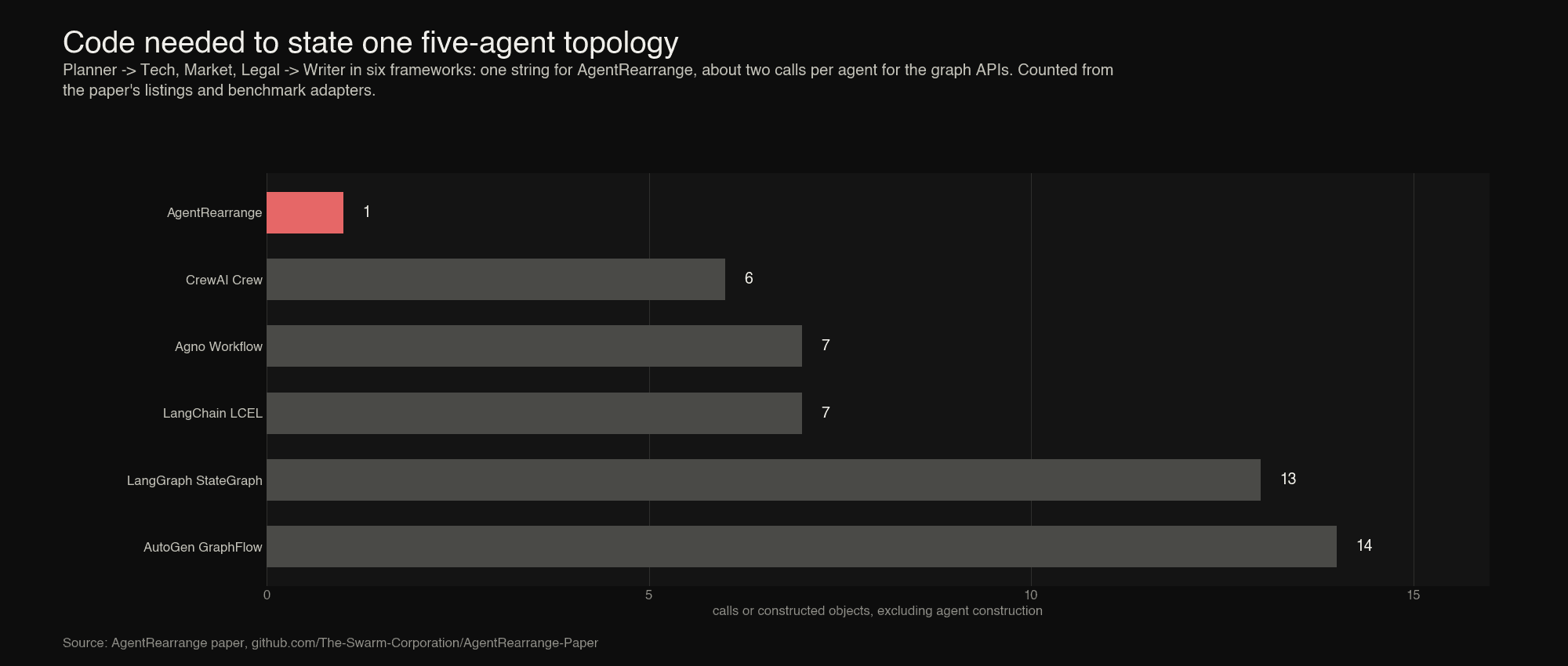
The count understates one difference. In the graph APIs the topology is spread across statements that must agree with one another: a node name used in an edge must match a node added earlier, and moving an agent means finding and editing every edge that touches it. In AgentRearrange the topology is one value. It can be stored in a configuration file, produced by a model, compared with ==, and shown to a reviewer in a diff of one line.
The Benchmark
The Swarms repository already had a framework benchmark that measures a flat fan-out. The suite introduced in this paper extends it to workflows with structure.
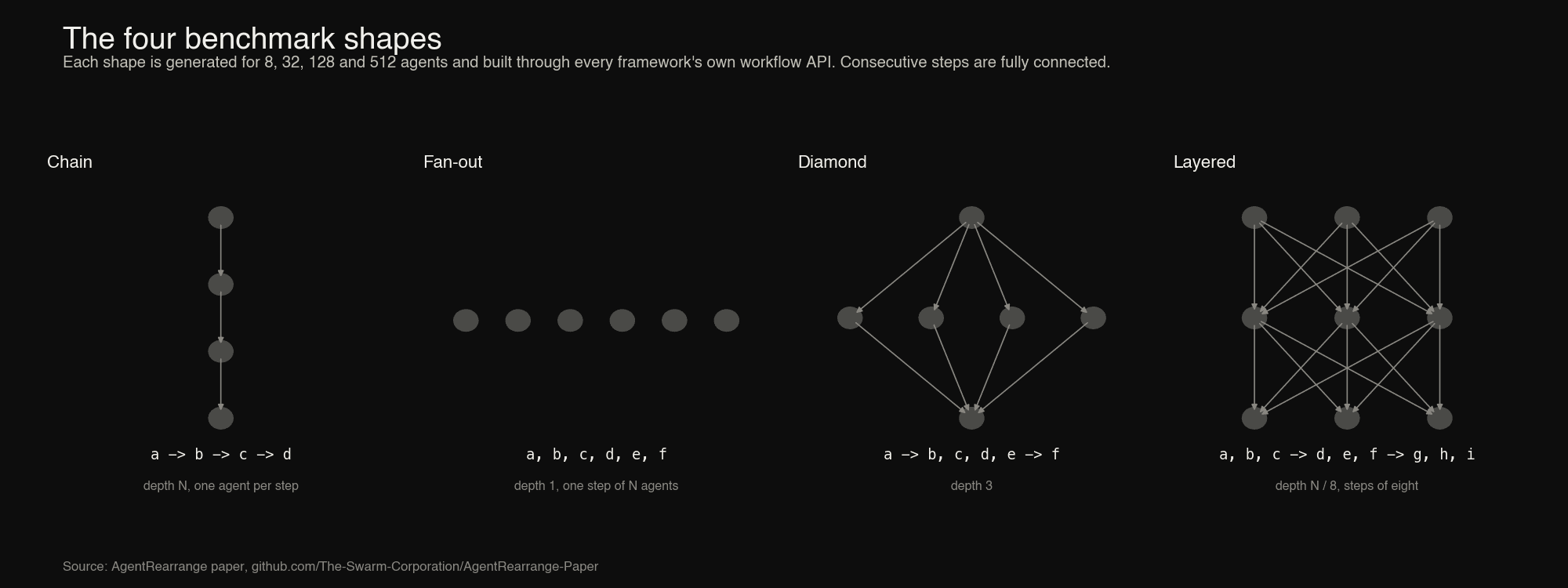
Four shapes, each generated for N agents with N in 8, 32, 128 and 512:
- Chain: N steps of one agent. Depth N.
- Fan-out: one step of N agents. Depth 1.
- Diamond: one agent, then N minus 2 agents in parallel, then one agent. Depth 3.
- Layered: steps of eight agents, each step reading the one before. Depth N over 8.
Seven configurations. Every shape is built through the workflow API of each framework: AgentRearrange in Swarms 17, StateGraph in LangGraph 0.5.4, the expression language of LangChain Core 0.3.63, AutoGen AgentChat 0.7.5 GraphFlow, Agno 3.2.0 Workflow and CrewAI 1.15.40 Crew. LangGraph appears twice, because its nodes can be plain functions or agents and the two cost very different amounts. LangGraph (functions) uses a function per node that calls the model and appends to a list, the lightest graph LangGraph can run. LangGraph (agents) uses a prebuilt agent per node over a shared message state, which is the closer match to what AgentRearrange runs. A sequential CrewAI crew cannot end in more than one asynchronous task, so it cannot express the fan-out or layered shapes; those cells are empty.
A stubbed model. Every agent in every framework calls the same stub, which waits 10 ms and returns a fixed string, through the framework's own model interface. No network is involved, so the differences measured are the frameworks' own work.
Metrics. Each cell (framework, shape, size) runs in a fresh interpreter after a small warm-up workflow. Orchestration overhead is the wall-clock time of a run minus the model time of that run, where the model time of a step is the duration of its fastest call and the model time of a run is the sum over its steps; what is left is time the framework spent doing something other than waiting for a model. The suite also records peak traced memory, construction time for the agents and the workflow, re-specification time to change the topology of an existing set of agents and back, peak threads, and the number of model calls, as a check that every framework ran exactly N calls, which all did. All measurements come from one machine: Apple M3 Pro, 12 cores, 18 GB, macOS 15.7, Python 3.12.3.
Results: Orchestration Overhead
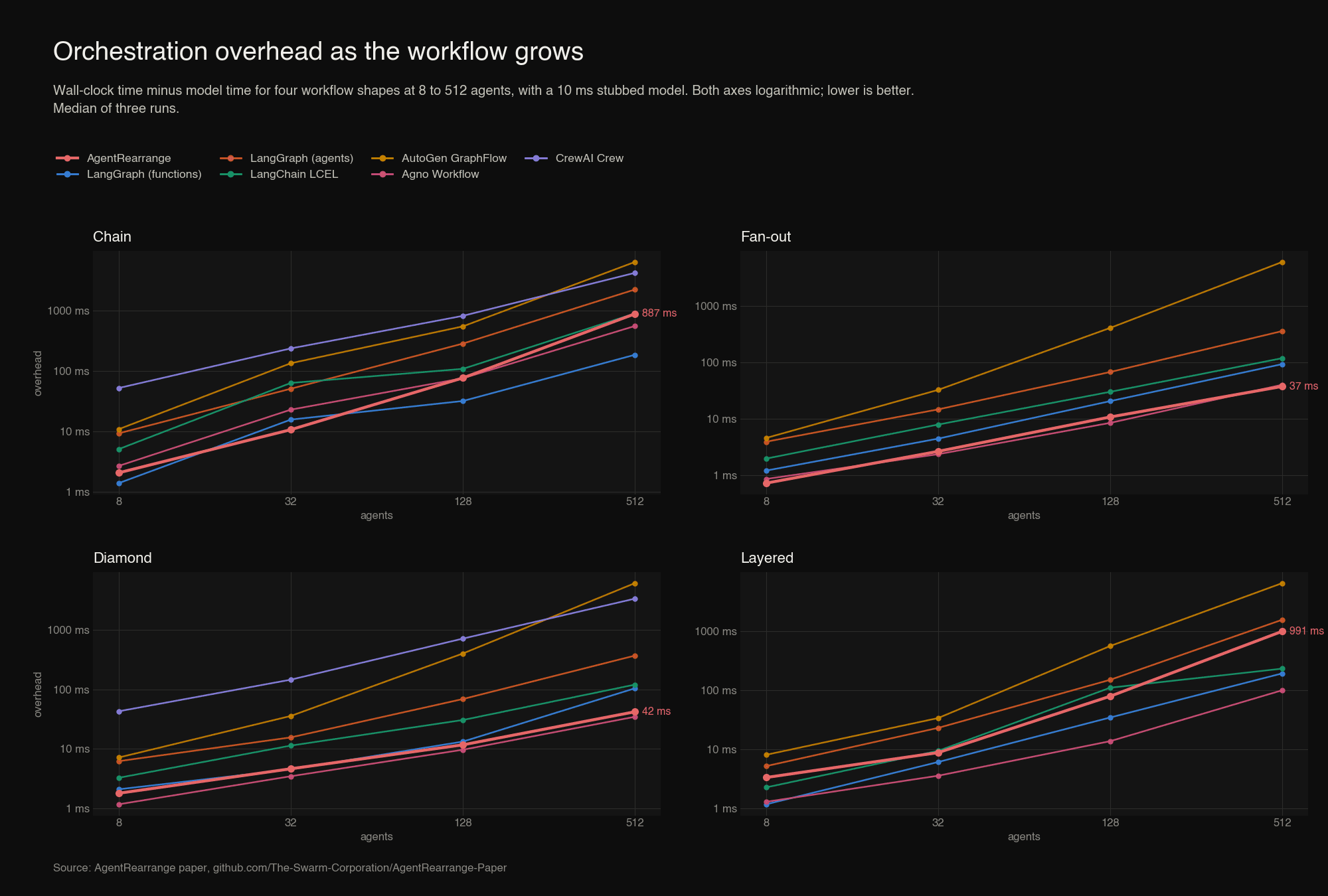
Overhead at 512 agents, in milliseconds, median of three runs. Bold marks the lowest value in each column.
| Chain | Fan-out | Diamond | Layered |
|---|
| AgentRearrange | 887 | 37.1 | 42.1 | 991 |
| LangGraph (functions) | 186 | 92.3 | 105 | 192 |
| LangGraph (agents) | 2,246 | 355 | 372 | 1,556 |
| LangChain LCEL | 901 | 117 | 121 | 231 |
| AutoGen GraphFlow | 6,432 | 5,970 | 6,174 | 6,486 |
| Agno Workflow | 558 | 39.7 | 34.7 | 99.6 |
| CrewAI Crew | 4,240 | n/a | 3,380 | n/a |
Three results stand out.
Wide workflows scale well. In the fan-out and diamond shapes AgentRearrange adds 37 ms and 42 ms at 512 agents, under a tenth of a millisecond per agent. That is 2.5 times less than LangGraph with function nodes (92 ms and 105 ms), about 9 times less than LangGraph with agent nodes (355 ms and 372 ms), 3 times less than LangChain, and more than two orders of magnitude less than AutoGen GraphFlow, whose overhead grows faster than linearly and reaches six seconds. Only Agno is in the same range, slightly lower on the diamond and slightly higher on the fan-out. At every size, AgentRearrange is within 8 ms of the lowest overhead on both shapes.
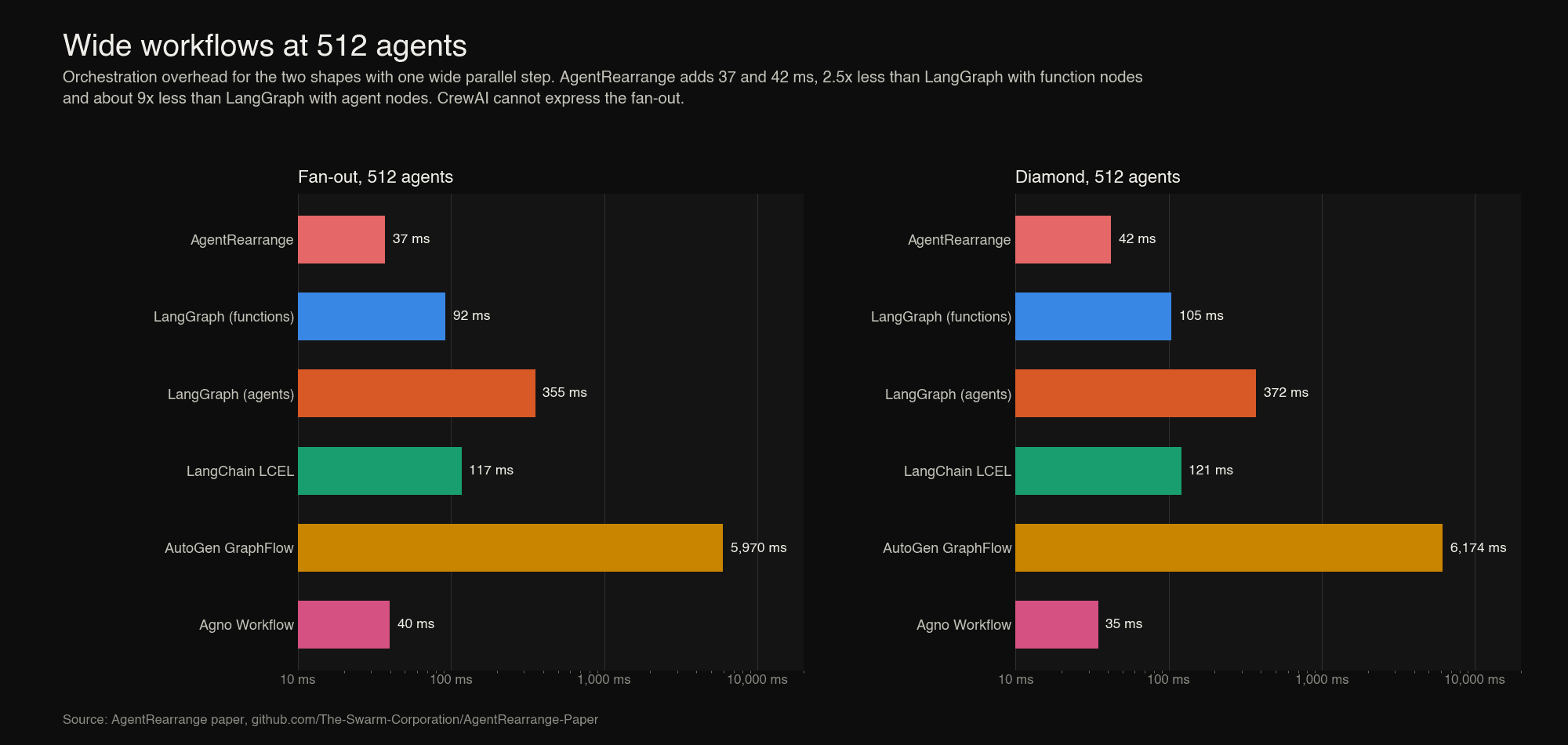
Against graph frameworks whose nodes are agents, AgentRearrange is lower everywhere. It has less overhead than LangGraph with agent nodes, AutoGen GraphFlow and CrewAI in every one of the cells those frameworks can run, across all four shapes and all four sizes. The margin over LangGraph with agent nodes ranges from 1.6 times (layered, 512 agents) to 9.6 times (fan-out, 512 agents).
Deep workflows expose the cost of the shared conversation. The chain and layered shapes tell a different story at scale. Up to 32 agents AgentRearrange is the lowest or within 6 ms of the lowest in every shape. At 128 agents and beyond its overhead in deep workflows grows faster than linearly: 887 ms for a 512-agent chain and 991 ms for 512 agents in 64 layers, against 186 ms and 192 ms for LangGraph with function nodes. The cause is the execution model. Before each agent runs, the whole conversation so far is rendered into messages for it, so step k does work proportional to k and a run does work proportional to the square of its depth. A LangGraph function node that appends one item to a list does constant work per step. The same effect appears in the frameworks that also pass history between agents: LangGraph with agent nodes and AutoGen are both slower than AgentRearrange on the 512-agent chain, at 2.2 and 6.4 seconds.
The paper calls this an honest trade. With a real model the same design makes the input of step k grow with k, and the token bill, not the 1.7 ms of orchestration per agent, is what a user of a 512-step chain would notice. Chains of that length are not what the language is for.
Results: Memory, Construction and Threads
Peak traced memory at 512 agents, in megabytes:
| Chain | Fan-out | Diamond | Layered |
|---|
| AgentRearrange | 52.5 | 5.8 | 5.9 | 52.0 |
| LangGraph (functions) | 2.4 | 6.5 | 6.9 | 6.1 |
| LangGraph (agents) | 8.4 | 12.5 | 13.1 | 13.0 |
| LangChain LCEL | 5.7 | 7.4 | 7.3 | 5.4 |
| AutoGen GraphFlow | 68.7 | 8.8 | 10.1 | 69.8 |
| Agno Workflow | 5.5 | 9.4 | 9.4 | 5.6 |
| CrewAI Crew | 49.7 | n/a | 56.3 | n/a |
Construction time for 512 agents and their workflow, in milliseconds:
| Chain | Fan-out | Diamond | Layered |
|---|
| AgentRearrange | 8 | 8 | 8 | 9 |
| LangGraph (functions) | 49 | 44 | 31 | 42 |
| LangGraph (agents) | 246 | 167 | 171 | 169 |
| LangChain LCEL | 20 | 23 | 27 | 12 |
| AutoGen GraphFlow | 6 | 5 | 17 | 15 |
| Agno Workflow | 6 | 6 | 5 | 7 |
| CrewAI Crew | 29 | n/a | 34 | n/a |
Memory follows the same split as overhead. For the wide shapes AgentRearrange has the lowest peak memory of any framework measured, 5.8 MB for the fan-out and 5.9 MB for the diamond. For the deep shapes it peaks at about 52 MB, because the conversation is rendered once per step; only AutoGen, at about 69 MB, uses more.
Construction is cheap and linear: building 512 agents and their workflow takes about 8 ms with AgentRearrange, which is 16 microseconds per agent. AutoGen and Agno are in the same range. LangGraph takes 31 to 49 ms with function nodes and 167 to 246 ms with agent nodes, since each prebuilt agent is itself a compiled graph.
Parallel steps cost threads. AgentRearrange runs a parallel step on one thread per agent, as do LangGraph and LangChain when their nodes call a synchronous model, and the suite sampled 324 threads for the 512-agent fan-out. AutoGen and Agno run on one thread because they are asynchronous throughout. Threads are the reason AgentRearrange is not further ahead on wide shapes, and removing them is the first item of future work.
Results: Re-specification
The name AgentRearrange makes a claim: that changing the arrangement of agents is cheap. The suite measures it by switching an existing set of agents to another shape and back. For AgentRearrange this is set_custom_flow; for the others it is rebuilding the workflow object around the same agents, and for LangGraph recompiling it.
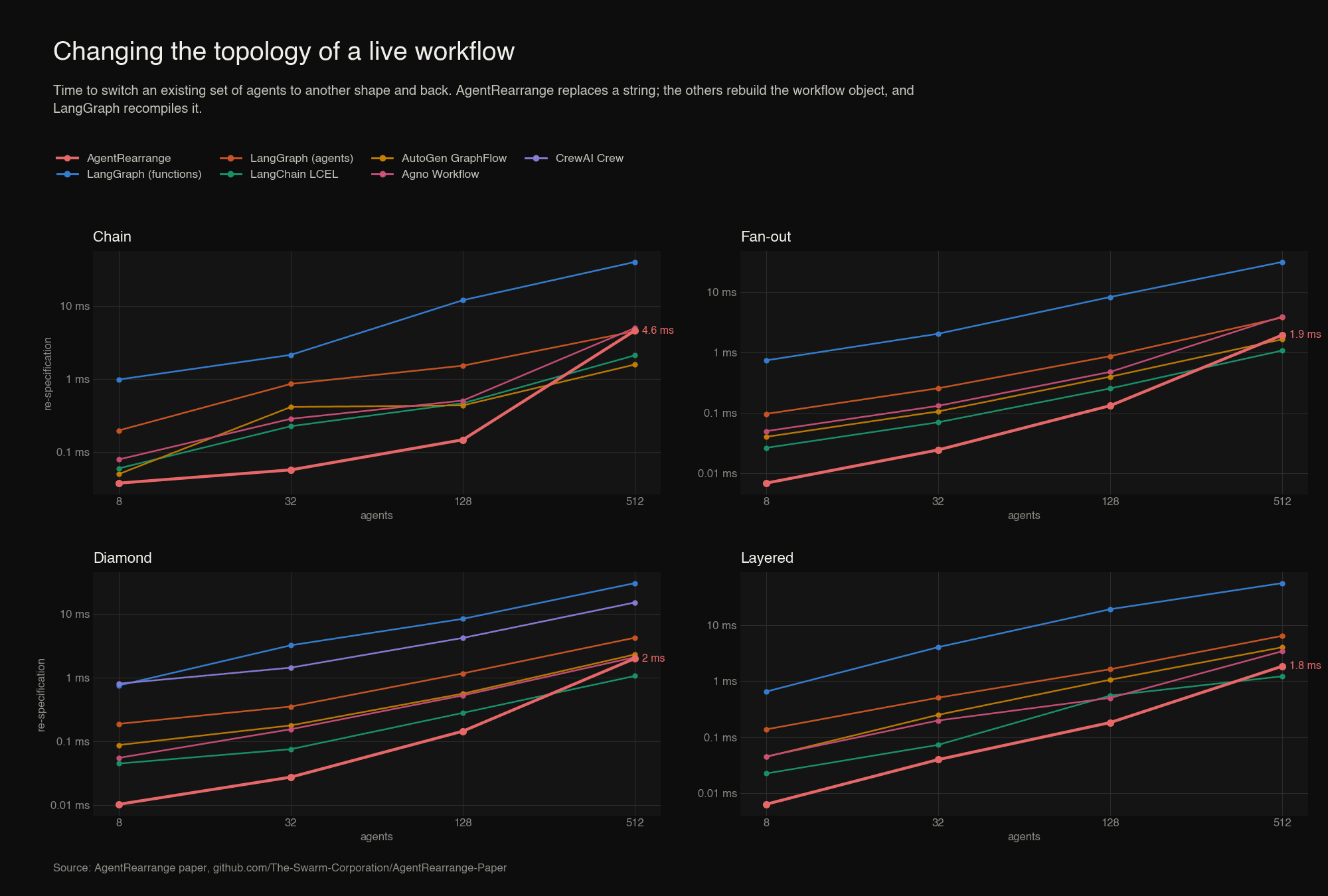
Up to 128 agents AgentRearrange is the fastest framework in every shape: replacing the flow of a 128-agent workflow takes between 0.13 and 0.18 ms, against 8 to 19 ms to rebuild and recompile a LangGraph graph with function nodes, a factor of 58 to 105. At 512 agents AgentRearrange takes 1.8 to 4.6 ms and LangGraph 30 to 56 ms, a factor of 9 to 30, but LangChain and AutoGen, whose builders do no validation, are faster than AgentRearrange at that size by up to a factor of three. The reason is visible in the curve: AgentRearrange validates every name in the new flow by scanning the list of members, which is quadratic in the number of agents and only shows at this scale.
Re-specification time at 512 agents, in milliseconds:
| Chain | Fan-out | Diamond | Layered |
|---|
| AgentRearrange | 4.61 | 1.93 | 1.99 | 1.85 |
| LangGraph (functions) | 40.21 | 31.21 | 30.27 | 56.02 |
| LangGraph (agents) | 4.52 | 3.76 | 4.20 | 6.44 |
| LangChain LCEL | 2.12 | 1.07 | 1.06 | 1.22 |
| AutoGen GraphFlow | 1.58 | 1.64 | 2.29 | 4.03 |
| Agno Workflow | 5.02 | 3.92 | 2.08 | 3.42 |
| CrewAI Crew | n/a | n/a | 15.04 | n/a |
In absolute terms all of these times are small next to a model call. The practical difference is what the operation is: in AgentRearrange it is one validated assignment on a live object, and in the graph frameworks it is a second construction of the workflow.
Context: The Flat Fan-out Benchmark
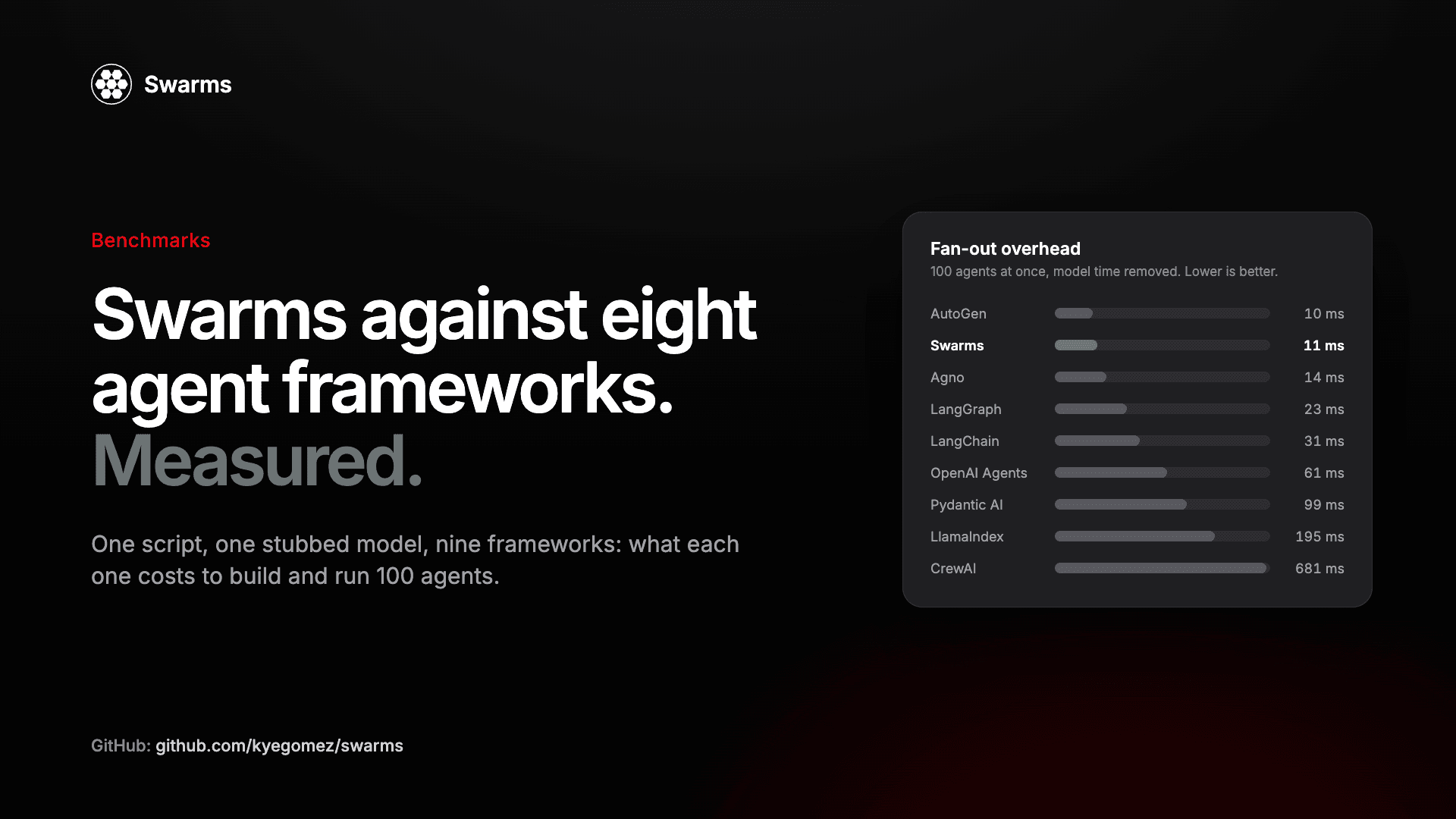
For reference, the paper reproduces the existing Swarms benchmark, which runs a flat fan-out of full agents with a 200 ms stub through nine frameworks, including three that have no workflow layer and are driven with asyncio.gather. Its Swarms column measures ConcurrentWorkflow, not AgentRearrange, and it shows where the agent substrate that AgentRearrange arranges stands: lowest or second-lowest overhead, and among the heaviest agent objects. The 100-agent rows are medians of three runs; the 1,000-agent rows are one run. We covered that benchmark in detail in Swarms vs. eight agent frameworks.
| Framework | Overhead, 100 agents (ms) | Overhead, 1,000 agents (ms) | Peak memory, 1,000 agents (MB) | Memory per agent (KB) | Cold import (s) |
|---|
| Swarms | 6 | 58 | 14.2 | 6.6 | 0.27 |
| LangGraph | 19 | 304 | 18.4 | 3.8 | 0.28 |
| LangChain | 35 | 307 | 18.8 | 6.6 | 0.03 |
| CrewAI | 580 | 8,461 | 111.8 | 5.6 | 1.82 |
| AutoGen | 9 | 51 | 10.0 | 1.8 | 0.23 |
| OpenAI Agents | 73 | 557 | 34.3 | 2.1 | 0.76 |
| Pydantic AI | 110 | 1,239 | 87.9 | 6.2 | 0.39 |
| LlamaIndex | 170 | 2,334 | 104.0 | 4.0 | 0.65 |
| Agno | 16 | 72 | 16.8 | 3.9 | 0.24 |
What the String Gives Up
The language is deliberately small, and the paper states what it omits as plainly as the results. A flow always runs every step: there are no conditional edges and no cycles, and max_loops repeats the whole flow a fixed number of times rather than looping until a condition holds. Consecutive steps are fully connected, so a dependency structure in which one agent needs only some of the previous step's answers can be over-approximated but not stated exactly; GraphWorkflow covers general DAGs. Every member reads everything written before it, which removes plumbing code but makes the total input tokens in a chain of N agents grow as N squared. Agents are referenced by name, so names must be unique within a workflow and cannot contain a comma or the arrow. A parallel step of w agents holds w threads for its duration. And a run is not resumable from the middle.
Three directions for future work follow directly from the measurements: running parallel steps on one event loop, as ConcurrentWorkflow in Swarms now does; giving members a bounded view of the conversation, for example only the previous step; and a small extension of the grammar, such as parentheses for inline nesting, so that a series-parallel workflow of any depth is still a single string. The paper's Discussion section has the full account, including threats to validity.
Use AgentRearrange in the Swarms Framework
AgentRearrange ships in the swarms package. Install it and set a model provider key:
pip install -U swarms
export OPENAI_API_KEY="..."
The five-agent workflow from the paper, with short system prompts so each specialist stays in its lane:
from swarms import Agent, AgentRearrange

planner = Agent(
    agent_name="Planner",
    system_prompt="Turn the task into three to five concrete questions for the specialists.",
    model_name="gpt-5.4",
    max_loops=1,
)
tech = Agent(agent_name="Tech", system_prompt="Answer the technical questions only.", model_name="gpt-5.4", max_loops=1)
market = Agent(agent_name="Market", system_prompt="Answer the market questions only.", model_name="gpt-5.4", max_loops=1)
legal = Agent(agent_name="Legal", system_prompt="Answer the legal and regulatory questions only.", model_name="gpt-5.4", max_loops=1)
writer = Agent(
    agent_name="Writer",
    system_prompt="Write a one-page recommendation from the specialists' answers, citing which specialist each point came from.",
    model_name="gpt-5.4",
    max_loops=1,
)

workflow = AgentRearrange(
    agents=[planner, tech, market, legal, writer],
    flow="Planner -> Tech, Market, Legal -> Writer",
    max_loops=1,
    output_type="final",  # return only the Writer's answer
)

workflow.explain()  # prints the plan, calls no model
report = workflow.run("Assess launching a payments product in the EU.")
print(report)
The same agents in a different arrangement is one assignment. If the new flow has a typo, the old one stays in place:
workflow.set_custom_flow("Planner -> Tech -> Market -> Legal -> Writer")  # a chain
workflow.set_custom_flow("Tech, Market, Legal -> Writer")                 # skip the planner
A draft-critique-revise loop reuses an agent by naming it twice. With team_awareness=True each agent is told who comes before and after it:
from swarms import Agent, AgentRearrange

writer = Agent(agent_name="writer", model_name="gpt-5.4", max_loops=1)
reviewer = Agent(agent_name="reviewer", model_name="gpt-5.4", max_loops=1)

revise = AgentRearrange(
    agents=[writer, reviewer],
    flow="writer -> reviewer -> writer",
    max_loops=1,
    team_awareness=True,
)
result = revise.run("Draft, critique, then revise a short essay on Hannah Arendt.")
Many tasks through one workflow, and streaming:
# Each task runs on an independent copy of the workflow, so transcripts never mix.
reports = workflow.batch_run([
    "Assess launching a payments product in the EU.",
    "Assess launching a payments product in Brazil.",
])

# Tokens from the agents of a parallel step arrive interleaved and labelled by agent.
for chunk in workflow.run_stream("Assess launching a payments product in Japan."):
    print(chunk, end="")
The flow string is also accepted by SwarmRouter with swarm_type="AgentRearrange", so a router that picks a swarm type at run time can hand the same agents the same flow.
Use AgentRearrange Through the Swarms API
If you would rather not host the agents yourself, the Swarms API runs the same primitive on managed infrastructure. The swarm type is AgentRearrange and the flow goes in rearrange_flow; the names in the flow must match the agent_name values exactly. Get a key at cloud.swarms.world/api-keys.
Save the request as payments_flow.json:
{
  "name": "EU payments launch assessment",
  "description": "Planner first, three specialists in parallel, then a writer",
  "swarm_type": "AgentRearrange",
  "rearrange_flow": "Planner -> Tech, Market, Legal -> Writer",
  "max_loops": 1,
  "task": "Assess launching a payments product in the EU. Keep every answer under 120 words.",
  "agents": [
    {
      "agent_name": "Planner",
      "description": "Breaks the assessment into questions for the specialists",
      "system_prompt": "You turn the task into three to five concrete questions, one line each, for technical, market and legal specialists. No answers.",
      "model_name": "gpt-5.4-mini",
      "max_loops": 1,
      "max_tokens": 400,
      "temperature": 0.3
    },
    {
      "agent_name": "Tech",
      "description": "Answers the technical questions",
      "system_prompt": "You answer only the technical questions in the plan, in under 120 words.",
      "model_name": "gpt-5.4-mini",
      "max_loops": 1,
      "max_tokens": 400,
      "temperature": 0.3
    },
    {
      "agent_name": "Market",
      "description": "Answers the market questions",
      "system_prompt": "You answer only the market questions in the plan, in under 120 words.",
      "model_name": "gpt-5.4-mini",
      "max_loops": 1,
      "max_tokens": 400,
      "temperature": 0.3
    },
    {
      "agent_name": "Legal",
      "description": "Answers the legal and regulatory questions",
      "system_prompt": "You answer only the legal and regulatory questions in the plan, in under 120 words.",
      "model_name": "gpt-5.4-mini",
      "max_loops": 1,
      "max_tokens": 400,
      "temperature": 0.3
    },
    {
      "agent_name": "Writer",
      "description": "Writes the final recommendation from the specialists' answers",
      "system_prompt": "You write a five-sentence recommendation from the specialists' answers. Cite which specialist each point came from.",
      "model_name": "gpt-5.4-mini",
      "max_loops": 1,
      "max_tokens": 500,
      "temperature": 0.3
    }
  ]
}
Send it with cURL:
curl -X POST "https://api.swarms.world/v1/swarm/completions" \
  -H "x-api-key: $SWARMS_API_KEY" \
  -H "Content-Type: application/json" \
  -d @payments_flow.json
Or from Python:
import json
import os

import requests

with open("payments_flow.json") as f:
    payload = json.load(f)

response = requests.post(
    "https://api.swarms.world/v1/swarm/completions",
    headers={"x-api-key": os.environ["SWARMS_API_KEY"], "Content-Type": "application/json"},
    json=payload,
    timeout=600,
)
response.raise_for_status()
result = response.json()

for turn in result["output"]:
    print(f"--- {turn['role']} ---")
    print(turn["content"])

print(result["usage"]["total_tokens"], "tokens,", result["usage"]["total_cost"], "USD")
We ran exactly this request while writing the article. The response lists one turn per agent in flow order, so the Planner comes first, the three specialists next in the order the flow names them, and the Writer last, followed by the usage block. Trimmed:
{
  "job_id": "swarm-47d9aaf47712ff511d88f087c7f392ce",
  "status": "success",
  "swarm_name": "EU payments launch assessment",
  "swarm_type": "AgentRearrange",
  "output": [
    { "role": "Planner", "content": "1. **Tech:** What architecture, security controls, licensing dependencies, and data localization requirements are needed ..." },
    { "role": "Tech",    "content": "1. Use a PCI-DSS-aligned, API-first, modular architecture with strong segregation of duties ..." },
    { "role": "Market",  "content": "Best near-term EU bets: SMEs/marketplaces/saas needing local bank transfer, cards, and payouts ..." },
    { "role": "Legal",   "content": "For an EU payments product, key legal obligations include: payment services licensing under PSD2 ..." },
    { "role": "Writer",  "content": "From **Tech**, use a PCI-DSS-aligned, API-first, modular setup ... From **Market**, the strongest near-term wedge is SMEs ... From **Legal**, you likely need PSD2 payment services or e-money licensing ..." }
  ],
  "number_of_agents": 5,
  "execution_time": 7.52,
  "usage": {
    "input_tokens": 1211,
    "output_tokens": 736,
    "total_tokens": 1947,
    "total_cost": 0.054853
  }
}
Five agents, three of them in parallel, 7.5 seconds end to end and about five cents. To rearrange the team, change rearrange_flow and send the request again; the agent definitions do not move. To run the same flow across many tasks, the batch endpoint at /v1/swarm/batch/completions takes a list of these payloads.
Reproduce the Numbers
The benchmark suite needs no API key. Clone the paper repository, install the frameworks, and run it:
git clone https://github.com/The-Swarm-Corporation/AgentRearrange-Paper
cd AgentRearrange-Paper

pip install swarms langgraph langchain-core autogen-agentchat autogen-ext agno crewai
python benchmarks/benchmark_agent_rearrange.py --out results.json
The script regenerates every measurement behind the figures and tables above. A framework that is not installed is reported as an error for its cells and the rest still run. The raw numbers behind the paper are in benchmarks/results/scaling_2026-11-13.json, the adapters that build each shape in each framework are in benchmarks/equivalents/, and the paper's single-file LaTeX source builds with tectonic paper.tex.
Conclusion
AgentRearrange reduces the specification of a multi-agent workflow to a string with two operators. The string is short, it is validated before anything runs, it can be inspected and replaced on a live workflow, and, with nesting, it covers every series-parallel arrangement of agents. The benchmark suite shows that the simplicity is not paid for in speed where the language is meant to be used: for workflows that are wide and a few steps deep, AgentRearrange has among the lowest orchestration overhead and the lowest memory of the frameworks measured, and it is cheaper than every graph framework whose nodes are full agents at every size. The same suite shows where the design stops scaling, in chains of hundreds of agents that all read one shared conversation, and that result points at the next improvements. For the workflows that most multi-agent systems consist of, a line of text is enough.
Links and Resources