指南工程
运行一个多智能体系统要花多少钱?来自 Swarms API 的真实数字
我们把同一个任务分别交给单个智能体和四种多智能体架构在 Swarms API 上运行,并从每个响应里读出账单。每次运行的费用、每 1,000 次运行的费用、钱花在哪里,以及降低费用的三个杠杆:模型搭配、max_loops 和夜间折扣。附基准测试脚本。
Kye Gomez11 分钟阅读

我们把同一个任务分别交给单个智能体和四种多智能体架构在 Swarms API 上运行,并从每个响应里读出账单。每次运行的费用、每 1,000 次运行的费用、钱花在哪里,以及降低费用的三个杠杆:模型搭配、max_loops 和夜间折扣。附基准测试脚本。
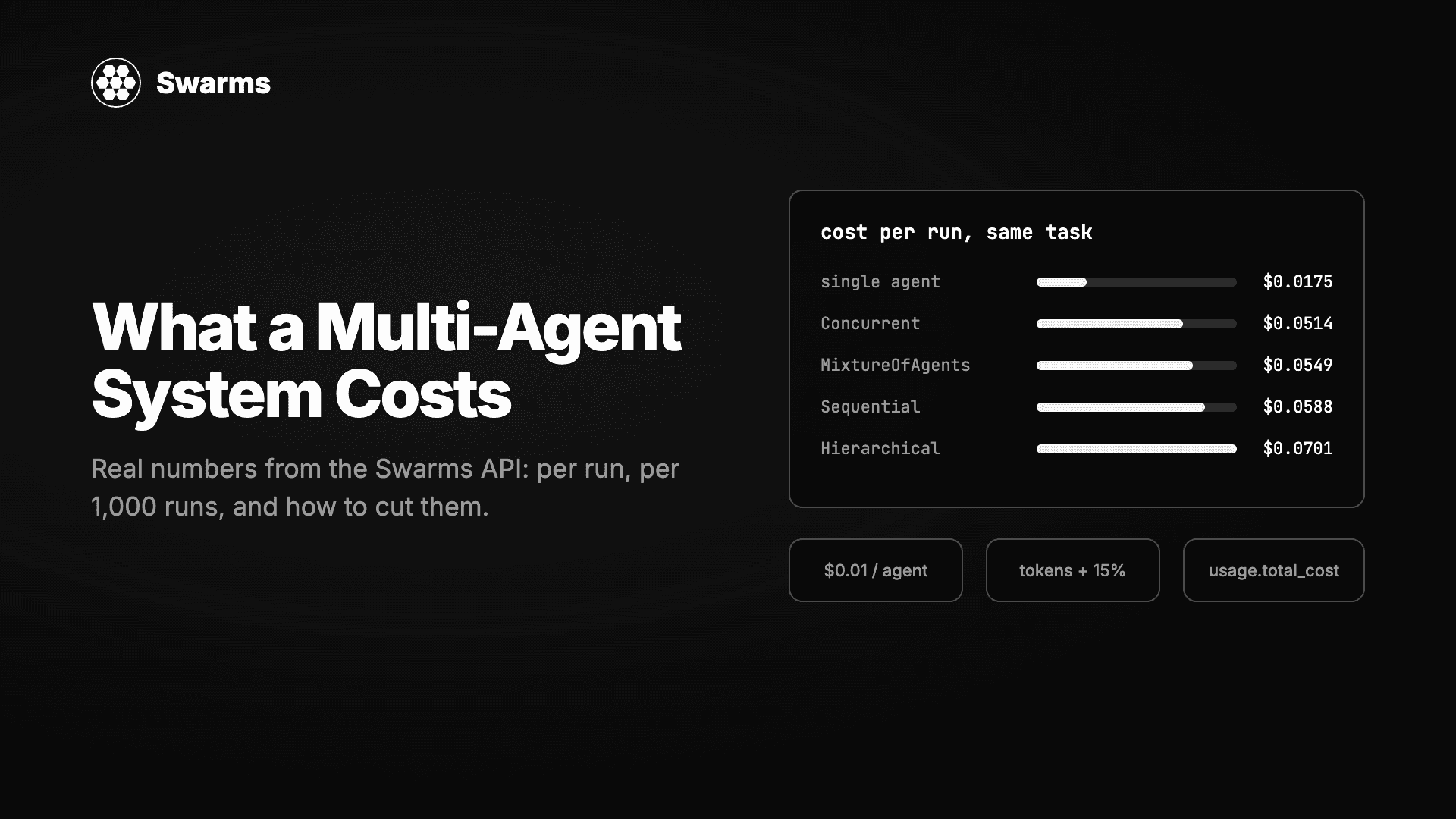
“规模上去之后要花多少钱?”是工程负责人对多智能体设计提出的第一个问题,也是大多数教程跳过的问题。答案并不神秘。Swarms API 的每个响应都带有一个 usage 块,写着这次运行的准确费用,所以你可以测量,而不是猜测。
这正是本文要做的。我们选了一个任务,一份 500 字的柏林电动滑板车市场竞争简报,分别用单个智能体和四种不同的三智能体集群运行它。下面是 API 报告的费用、推算到 1,000 次运行的数字、钱花在哪里的拆解,以及最能改变数字的三项调整。产生这些数据的脚本也附在文中,你可以在自己的任务上运行。
一次集群请求由三项构成:
GET /v1/models/pricing?model_name=... 返回已含服务费的当前费率。auto_search 联网搜索工具的请求 $0.04。MCP 服务器和 web_scraper 工具除 token 外不收费。对 /v1/agent/completions 的单智能体调用没有智能体费,只有 token。付费计划在太平洋时间晚 8 点到早 6 点之间对集群补全的 token 费用享受 50% 的夜间折扣,这对可以调度的批量工作很有意义。
我们运行基准测试当天的价格,每百万 token,已含服务费:
| 模型 | 输入 | 输出 |
|---|---|---|
claude-haiku-5-5 | $0.115 | $0.575 |
gemini-2.5-flash | $0.345 | $2.875 |
gpt-5.4-mini | $0.8625 | $5.175 |
claude-sonnet-5-5 | $2.30 | $11.50 |
gpt-5.4 | $2.875 | $17.25 |
最便宜和最贵的模型之间相差百倍,这是多智能体成本规划中最重要的单一事实。哪个智能体用哪个模型,比你选哪种架构更重要。
每个集群中都是同样的三个智能体:研究员用 gpt-5.4-mini,分析师用 claude-haiku-5-5,撰稿人用 claude-sonnet-5-5。单智能体基线是一个被要求独自完成整份简报的 claude-sonnet-5-5 智能体。脚本运行全部内容并打印一张表。
# swarm_cost_benchmark.py
# Runs the same task through one agent and four swarm architectures, then
# prints what each one cost. Requires: pip install requests
import os
import requests

API = "https://api.swarms.world"
HEADERS = {"x-api-key": os.environ["SWARMS_API_KEY"], "Content-Type": "application/json"}

TASK = (
    "Write a competitive brief on the shared electric scooter market in Berlin for an "
    "operator considering entry in 2027. Cover market size, three main competitors, "
    "regulatory risks and a recommendation. Keep the final brief under 500 words."
)

AGENTS = [
    {
        "agent_name": "Researcher",
        "system_prompt": "You are a market researcher. List the facts, figures and competitor details relevant to the task as concise bullet points. Do not write the brief.",
        "model_name": "gpt-5.4-mini",
        "max_loops": 1,
        "max_tokens": 1200,
    },
    {
        "agent_name": "Analyst",
        "system_prompt": "You are a strategy analyst. Turn the research into structured findings: market size, competitors, regulatory risks, and a recommendation with reasoning. Concise bullet points.",
        "model_name": "claude-haiku-5-5",
        "max_loops": 1,
        "max_tokens": 1200,
    },
    {
        "agent_name": "Writer",
        "system_prompt": "You are a business writer. Write the final competitive brief under 500 words with the sections: Market size, Main competitors, Regulatory risks, Recommendation.",
        "model_name": "claude-sonnet-5-5",
        "max_loops": 1,
        "max_tokens": 1500,
    },
]

ARCHITECTURES = ["SequentialWorkflow", "ConcurrentWorkflow", "HierarchicalSwarm", "MixtureOfAgents"]


def run_single_agent() -> dict:
    body = {
        "agent_config": {
            "agent_name": "Solo Analyst",
            "system_prompt": "You are a market analyst. Write a competitive brief with these sections: Market size, Main competitors (three), Regulatory risks, Recommendation. Keep it under 500 words and be specific.",
            "model_name": "claude-sonnet-5-5",
            "max_loops": 1,
            "max_tokens": 1500,
        },
        "task": TASK,
    }
    r = requests.post(f"{API}/v1/agent/completions", headers=HEADERS, json=body, timeout=300)
    r.raise_for_status()
    return r.json()


def run_swarm(swarm_type: str) -> dict:
    body = {
        "name": f"Cost Benchmark {swarm_type}",
        "swarm_type": swarm_type,
        "task": TASK,
        "agents": AGENTS,
        "max_loops": 1,
    }
    r = requests.post(f"{API}/v1/swarm/completions", headers=HEADERS, json=body, timeout=300)
    r.raise_for_status()
    return r.json()


def price(model_name: str) -> tuple[float, float]:
    r = requests.get(f"{API}/v1/models/pricing", headers=HEADERS, params={"model_name": model_name}, timeout=30)
    r.raise_for_status()
    data = r.json()
    return data["input_cost_per_1m"], data["output_cost_per_1m"]


if __name__ == "__main__":
    print("Model prices per 1M tokens (service fee included):")
    for model in sorted({a["model_name"] for a in AGENTS}):
        inp, out = price(model)
        print(f"  {model}: ${inp:.4f} in, ${out:.4f} out")

    rows = []
    single = run_single_agent()
    rows.append(("Single agent", 1, single["usage"], None))

    for swarm_type in ARCHITECTURES:
        data = run_swarm(swarm_type)
        rows.append((swarm_type, data["number_of_agents"], data["usage"], data["execution_time"]))

    print("\n| Architecture | Agents | Tokens | Agent fee | Per run | Per 1,000 | Time |")
    print("|---|---|---|---|---|---|---|")
    for name, agents, usage, seconds in rows:
        fee = usage.get("billing_info", {}).get("cost_breakdown", {}).get("agent_cost", 0.0)
        time_str = f"{seconds:.1f}s" if seconds else "n/a"
        print(
            f"| {name} | {agents} | {usage['total_tokens']:,} | ${fee:.2f} | "
            f"${usage['total_cost']:.4f} | ${usage['total_cost'] * 1000:,.2f} | {time_str} |"
)pip install requests
export SWARMS_API_KEY=your_key
python swarm_cost_benchmark.py整个基准测试运行一次大约花 25 美分。
以下是我们在 2026 年 11 月 8 日运行得到的 usage 块,每种架构运行一次,每 1,000 次的列是乘出来的。因为模型输出本身有波动,token 数量每次运行会略有不同,所以请把这些数字当作代表性数值而非固定值。
| 架构 | 智能体 | 输入 token | 输出 token | 智能体费 | Token 费用 | 每次运行 | 每 1,000 次 | 耗时 |
|---|---|---|---|---|---|---|---|---|
单智能体(claude-sonnet-5-5) | 1 | 106 | 1,500 | $0.00 | $0.0175 | $0.0175 | $17.49 | 无 |
| SequentialWorkflow | 3 | 5,064 | 3,424 | $0.03 | $0.0288 | $0.0588 | $58.76 | 22.2 秒 |
| ConcurrentWorkflow | 3 | 355 | 3,289 | $0.03 | $0.0214 | $0.0514 | $51.38 | 13.7 秒 |
| HierarchicalSwarm | 3 | 5,460 | 3,994 | $0.03 | $0.0401 | $0.0701 | $70.10 | 18.7 秒 |
| MixtureOfAgents | 3 | 1,818 | 3,316 | $0.03 | $0.0249 | $0.0549 | $54.89 | 18.9 秒 |
我们原本还计划加一行 HeavySwarm,但该架构在我们的测试时段返回了 503,所以宁可略去,也不做估算。
有几点值得注意。
对小型集群来说,智能体费占了账单的一半。 三美分的费用对两到四美分的 token。短任务配便宜模型时,费用占主导;长任务配昂贵模型时,token 占主导。这就是为什么使用小模型的双智能体集群,比如很多团队按 CRM 记录运行的线索补全配方,成本接近两美分。
输入 token 暴露了架构。 ConcurrentWorkflow 只用了 355 个输入 token,因为每个智能体只看到任务。SequentialWorkflow 用了 5,064 个,因为每个智能体还会收到它前面的全部内容。HierarchicalSwarm 用得最多,因为主管要为每个智能体写指令,再读取它们的结果。选择架构的同时,你也在选择上下文被重复读取多少次。
输出 token 大致恒定。 三个智能体各写一页,不管拓扑如何,都会产生大约 3,300 到 4,000 个输出 token。输出是所有价目表上更贵的一侧,所以这里正是 max_tokens 发挥作用的地方。
单智能体只要三分之一的价格,但效果更差。 单独运行的 Sonnet 在写完简报之前就撞到了 1,500 token 的上限,并自己标注了不确定性。集群则产出了一份背后有研究支撑的完整简报。值不值三倍价格是产品问题,但比较应该基于完成的输出,而不是只看费用一列。
把 SequentialWorkflow 的 token 数量按三个智能体都用同一种模型重新定价,能看出搭配有多重要:
| 三个智能体全部使用 | 每次运行 | 每 1,000 次 |
|---|---|---|
claude-haiku-5-5 | $0.0326 | $32.55 |
gpt-5.4-mini | $0.0521 | $52.09 |
| 我们的搭配(mini、haiku、sonnet) | $0.0588 | $58.76 |
claude-sonnet-5-5 | $0.0810 | $81.02 |
gpt-5.4 | $0.1036 | $103.62 |
实践中站得住脚的模式是:给用户会阅读其输出的那个智能体配强模型,给负责收集、分类或整理的智能体配又小又快的模型。我们用 Sonnet 的撰稿人搭配 Haiku 的分析师和 mini 的研究员,比全部用 Sonnet 便宜 27%,读起来没有差别,因为研究和分析步骤只是没人会看的要点列表。
max_loops 保持为 1每一轮循环都会让每个智能体带着上一轮的内容再跑一次。max_loops: 2 的 HierarchicalSwarm 大约让输出 token 翻倍,输入 token 翻得更多,因为第二轮要带上第一轮。当你需要主管做综合或批评者做修订时才用第二轮,不要把它当作质量保险。
同样的逻辑适用于 max_tokens。我们的智能体被限制在 1,200 到 1,500,对一份 500 字的简报绰绰有余。不设上限的 Sonnet 撰稿人在开放式提示下可能写到几千个 token,而价格是每百万 $11.50。
在付费计划上,太平洋时间晚 8 点到早 6 点之间的集群补全 token 费用减半。应用到我们的运行上:
| 架构 | 白天每 1,000 次 | 夜间每 1,000 次 |
|---|---|---|
| SequentialWorkflow | $58.76 | $44.38 |
| ConcurrentWorkflow | $51.38 | $40.69 |
| HierarchicalSwarm | $70.10 | $50.05 |
| MixtureOfAgents | $54.89 | $42.44 |
智能体费不打折,所以在这些小集群上节省的是四分之一左右而不是一半。在处理长文档的 token 密集型运行上,节省接近 50%。每个响应中的 billing_info.cost_breakdown.night_time_discount_applied 字段会告诉你这次运行是否享受了折扣。
你不需要基准测试也能得到这些数字。每个集群响应都包含它们,几行代码就能把一天的响应变成报表。
# cost_table.py
# Turns the usage blocks returned by the Swarms API into a per-run and
# per-1,000-run cost table. Paste in the "usage" object from each response.

RUNS = {
    "SequentialWorkflow": {
        "agents": 3, "seconds": 22.2,
        "usage": {"input_tokens": 5064, "output_tokens": 3424, "total_tokens": 8488, "total_cost": 0.058763,
                  "billing_info": {"cost_breakdown": {"agent_cost": 0.03, "input_token_cost": 0.007076, "output_token_cost": 0.021687}}},
    },
    "ConcurrentWorkflow": {
        "agents": 3, "seconds": 13.7,
        "usage": {"input_tokens": 355, "output_tokens": 3289, "total_tokens": 3644, "total_cost": 0.051382,
                  "billing_info": {"cost_breakdown": {"agent_cost": 0.03, "input_token_cost": 0.000394, "output_token_cost": 0.020988}}},
    },
}


def row(name: str, run: dict) -> str:
    u = run["usage"]
    breakdown = u.get("billing_info", {}).get("cost_breakdown", {})
    agent_fee = breakdown.get("agent_cost", 0.0)
    token_cost = u["total_cost"] - agent_fee
    per_1k = u["total_cost"] * 1000
    secs = f"{run['seconds']:.1f}s" if run["seconds"] else "n/a"
    return (
        f"| {name} | {run['agents']} | {u['input_tokens']:,} | {u['output_tokens']:,} | "
        f"${agent_fee:.3f} | ${token_cost:.4f} | ${u['total_cost']:.4f} | ${per_1k:,.2f} | {secs} |"
    )


print("| Architecture | Agents | Input tokens | Output tokens | Agent fee | Token cost | Per run | Per 1,000 runs | Time |")
print("|---|---|---|---|---|---|---|---|---|")
for name, run in RUNS.items():
    print(row(name, run))
在生产环境中,记录每个响应的 job_id 和 usage.total_cost,或者之后从 GET /v1/swarm/logs 拉取,再按客户或功能汇总。GET /v1/account/credits 返回实时余额用于告警,GET /v1/usage/costs 返回当前费率表,便于在运行前做估算。
假设你要给销售工具加一个“研究这个客户”按钮。两个智能体、小模型、每次运行约 3,000 个 token,就像线索补全的模式:
再假设同一个按钮运行的是带 Sonnet 撰稿人的三智能体 HierarchicalSwarm:每次约 $0.07,每天 $350,每月 $7,700。同一个功能,三倍的账单。差异几乎全部来自模型搭配和架构对上下文的重复读取。在做决定之前,用基准测试脚本把两种方案都测一遍,并把按记录的选择做进产品:默认用便宜的集群,把昂贵的放在“深度研究”选项后面。
在 Swarms API 上,混用小型和中型模型的三智能体集群,在我们的基准测试中每次运行费用在 $0.051 到 $0.070 之间,取决于架构。使用小模型的双智能体集群约 $0.023。同一任务上的单个中型智能体花费 $0.0175,但产出更弱且被截断。
每次集群请求每个智能体 $0.01,加上每个智能体按其模型价格计算的 token 及 15% 服务费。单智能体补全没有智能体费。图片每张 $0.25,启用联网搜索的请求每次 $0.04。付费计划在太平洋时间晚 8 点到早 6 点之间享受集群 token 费用五折。
在相同的智能体和任务下,ConcurrentWorkflow 最便宜,为 $0.051,因为每个智能体只读任务;HierarchicalSwarm 最贵,为 $0.070,因为主管增加了自己的 token 和每个智能体的上下文。架构之间的差距(36%)小于模型选择之间的差距(超过 200%)。
不,在我们的测试中更便宜。并行的智能体各自收到原始任务,而顺序的智能体会收到前面所有智能体累积的输出,所以顺序运行读取更多输入 token。并行运行还快了 38%。
只给有人会阅读其输出的智能体配昂贵模型,给每个智能体设置 max_tokens 上限,除非修订就是目标否则把 max_loops 保持为 1,并把批量作业安排进夜间折扣时段。我们的混合模型集群比全部使用一种强模型的同一集群便宜 27%,最终简报看不出差别。
curl -H "x-api-key: $SWARMS_API_KEY" \
  "https://api.swarms.world/v1/models/pricing?model_name=claude-haiku-5-5"
在围绕某个数字做设计之前,先在你自己的任务上运行上面的基准测试脚本。实时价格在 GET /v1/models/available,完整费率表在定价页面,Swarms API 文档涵盖了 usage 块中的每个字段。关于架构本身,集群架构详解描述了每种架构适用的场景。
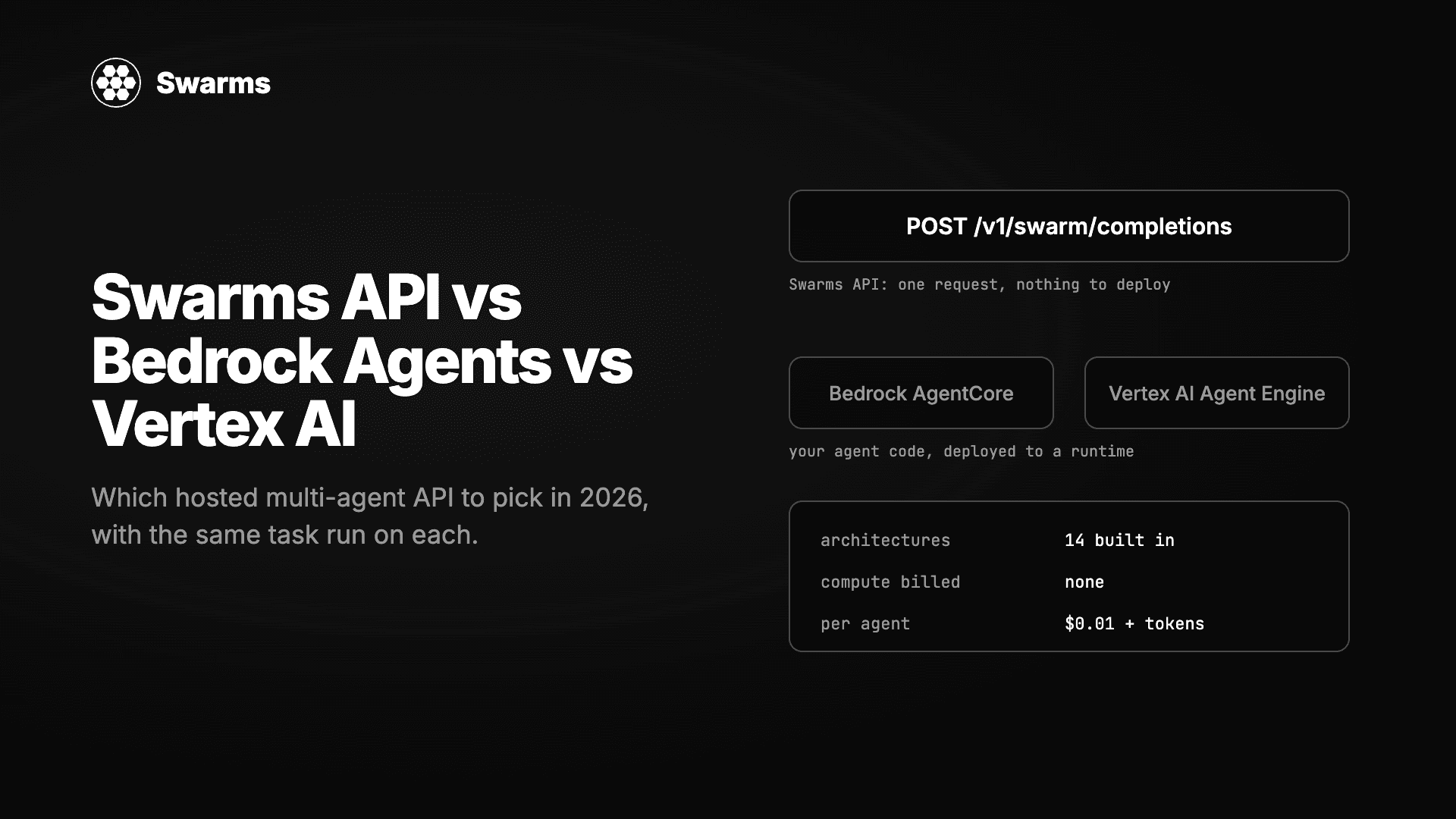
三种无需自建服务器即可运行多智能体系统的方式实测对比:Swarms API、Amazon Bedrock Agents 与 AgentCore、Google 的 Vertex AI Agent Builder 与 ADK。同一任务分别实现,逐项比较架构、模型选择、流式输出、批处理、定价以及拿到第一个结果所需的时间。
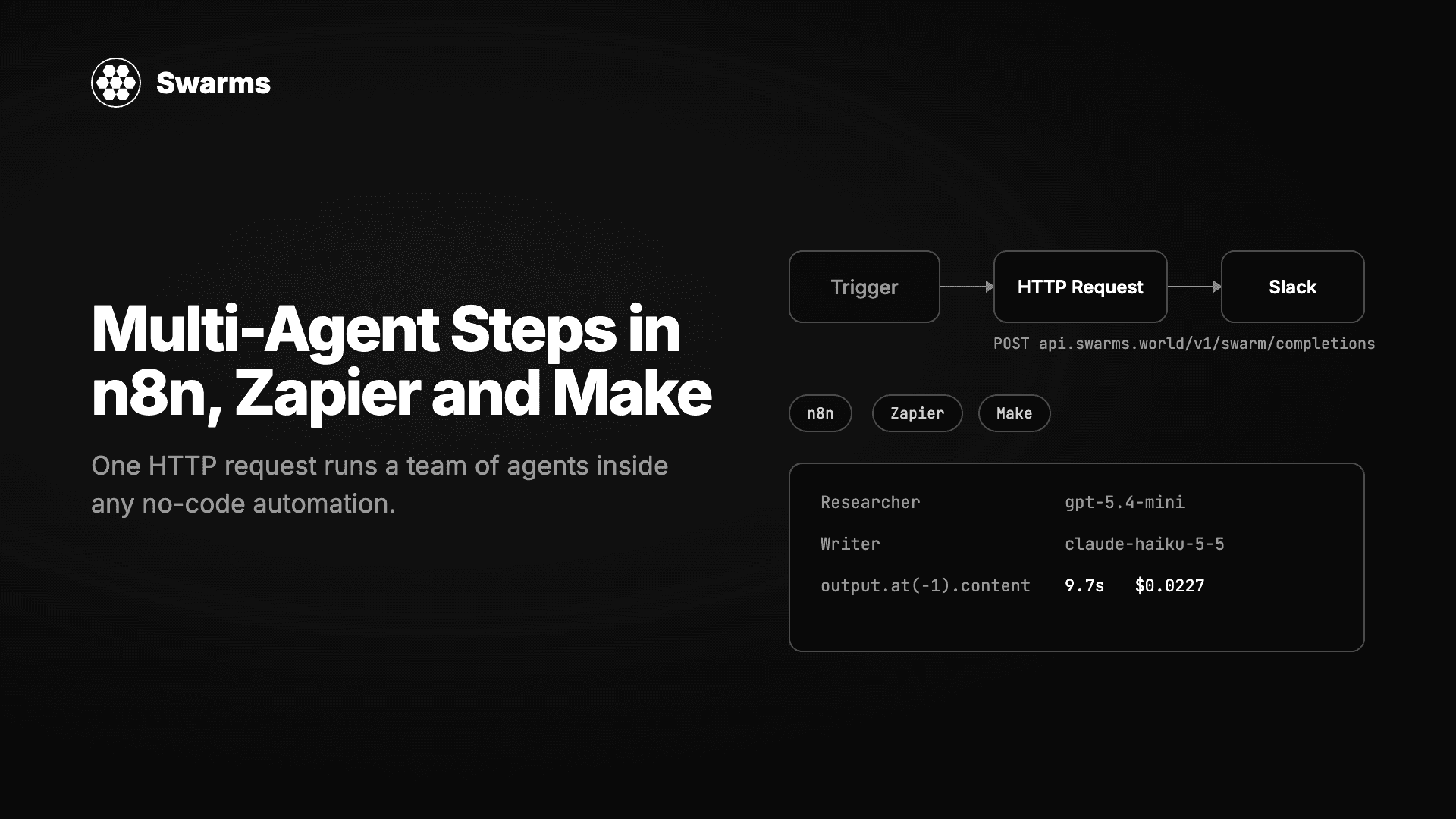
在任何无代码自动化工具中运行一支 AI 智能体团队。一个 HTTP Request 节点、一个 JSON 请求体,Swarms API 就会返回完成的工作。n8n、Zapier 和 Make 的逐步配置,外加三个可直接粘贴的配方:线索补全、工单分诊和每周报告。
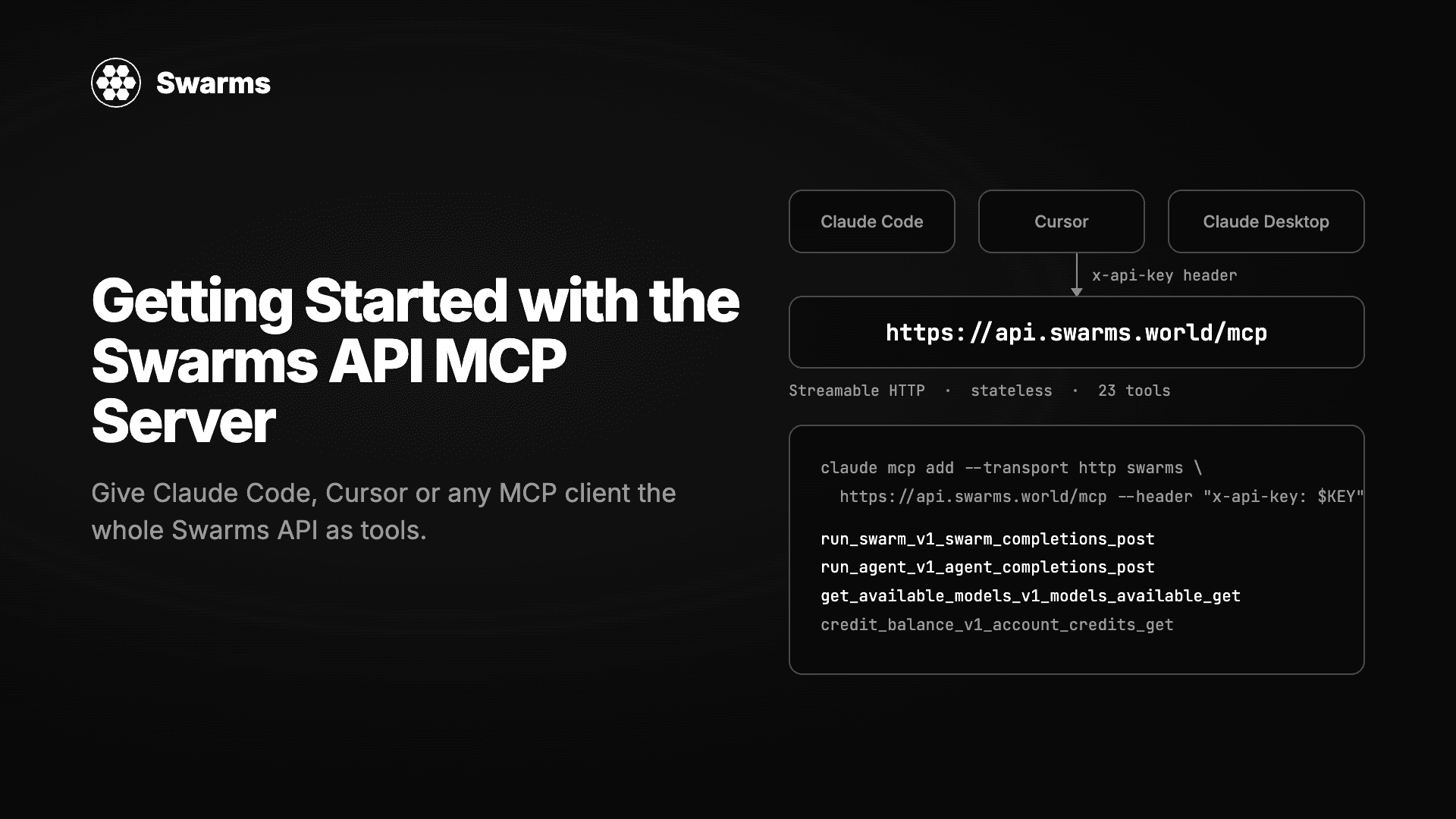
托管在 api.swarms.world/mcp 的 Swarms MCP 服务器完整教程。用两行配置连接 Claude Code、Claude Desktop、Cursor 或你自己的 Python 和 TypeScript 智能体,了解 23 个工具,从一句聊天提示运行你的第一个智能体和集群,读取结果和费用,并解决第一天会遇到的错误。