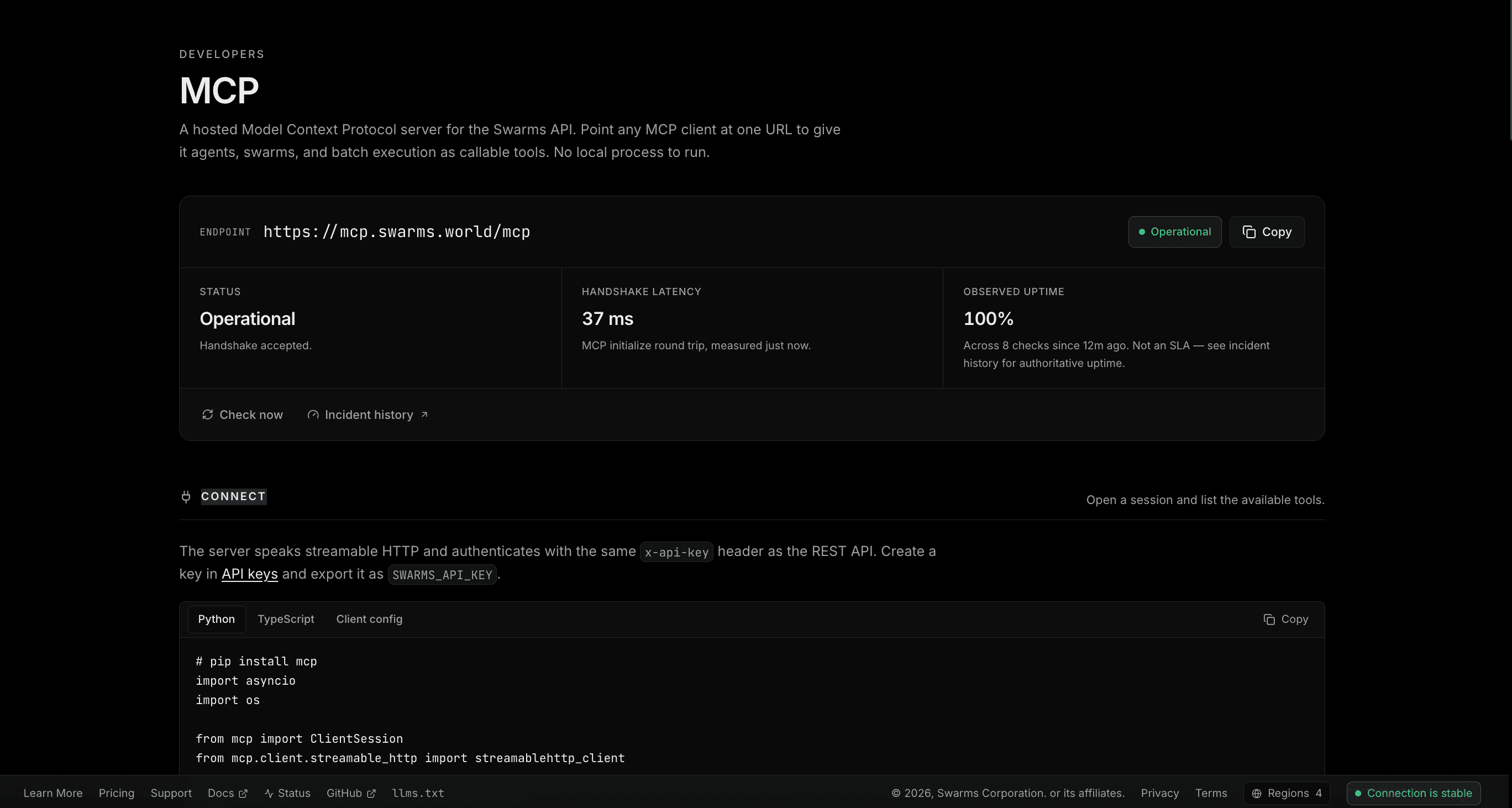
The Swarms API is now available over the Model Context Protocol at a single hosted endpoint, and it has a home in Swarms Cloud. The new MCP page is live at cloud.swarms.world/mcp, and the server itself answers at:
https://mcp.swarms.world/mcp
Point any MCP-compatible client at that URL and it gains agents, multi-agent swarms, batch execution, workflow orchestration, and account telemetry as callable tools. There is no package to install, no local process to supervise, and no per-workstation configuration to maintain.
First, a Clarification Worth Making
Swarms now has two things with MCP in the name, and they do different jobs. Getting this distinction right will save your team a confusing afternoon.
The MCP Portal on the Swarms Marketplace is a directory. It is where you discover, publish, and monetize MCP servers built by the community, connecting your agents to third-party tools like web scraping, search, and documentation retrieval.
The Swarms MCP server, announced here, is the opposite direction. It is not a directory of other people's tools. It is the Swarms platform itself, exposed as an MCP server, so that your agents and your MCP clients can call Swarms. One is how your agents reach the wider tool ecosystem. The other is how the wider ecosystem reaches Swarms.
What a Hosted MCP Server Changes
Most MCP servers in circulation today are local. You install a package, your client spawns it as a subprocess over stdio, and it runs on one machine. That model is fine for a single developer experimenting on a laptop. It becomes a liability at organizational scale, for reasons that will be familiar to anyone who has rolled out developer tooling across a team.
Local servers require distribution. Every workstation needs the package installed, at a compatible version, with a working runtime. Version drift across a team produces bug reports that cannot be reproduced.
Local servers put credentials on endpoints. An API key in a config file on fifty laptops is fifty copies of a secret outside your control, and rotating it means fifty coordinated changes.
Local servers do not survive the transition to production. The agent that worked in your editor cannot be deployed to a container, a CI runner, or a serverless function without repackaging the tool layer that made it work.
A remote server addresses all three. The endpoint is a URL, so distribution is a copy and paste. Authentication is a header, so credentials follow whatever secret management you already use. And the same URL that works in your editor works unchanged in a container, a scheduled job, or a production service. Upgrades happen server-side, which means a capability added to the Swarms API becomes available to every connected client at once, with no client update and no coordination.
Twenty-Three Tools, Available Immediately
Connect and call list_tools, and the server returns twenty-three tools spanning the Swarms API surface. They fall into five groups.
Execution. Run a single agent, run a multi-agent swarm, run a chat completion, run a reasoning agent, run a graph workflow, or hand a task to the Auto Agent Builder and let it design the team for you.
Batch. Fan a set of tasks across agents, run swarm completions in bulk, or execute a batched grid workflow. This is where MCP stops being a convenience and starts being infrastructure: an agent that can dispatch a hundred tasks and collect the results is doing work no chat interface can do.
Discovery. List available models, list available swarm architectures, list reasoning agent types, list available tools, list your saved agents, and check which premium endpoints your account can reach. Agents that can enumerate their own capabilities can adapt to them rather than hardcoding assumptions.
Account and observability. Read your rate limits, your credit balance, your usage costs, your metrics summary, and your execution logs. This group deserves particular attention from platform teams, because it means an agent can reason about its own consumption. A long-running process can check remaining credits before dispatching an expensive batch, or read its rate limit headroom before deciding on a concurrency level.
Health. Service health and root, for readiness checks.
Tool names come from the server rather than from documentation, so list_tools is always the authoritative answer for what your key can reach. Every connection example on the page begins with that call for exactly this reason.
Live Status, Reported Honestly
The MCP page carries a status panel for the endpoint, and it is worth explaining what it measures, because "operational" is a word that products use loosely.
The status is not a ping. A ping to a host proves that something is listening on a port, which is a weaker claim than most status indicators imply. Instead, Swarms Cloud sends a real MCP initialize handshake to the endpoint from the server side and reports the result. If the protocol answers, the endpoint is operational. If it returns a server error, that is an outage. If the endpoint is reachable but rejects an unauthenticated probe, that is still reported as operational, because a server declining an anonymous request is behaving correctly rather than failing.
The panel shows three figures: current status, handshake latency in milliseconds, and observed uptime. On the uptime figure we are being deliberately precise. It reflects the checks Swarms Cloud has actually performed, labeled with the sample count and the window, and it is explicitly not presented as a service level agreement. Authoritative incident history lives at status.swarms.ai, which the page links to directly. We would rather show you a number we can defend than a number that looks better.
Connecting in Python
The server speaks streamable HTTP and authenticates with the same x-api-key header as the REST API. Install the MCP SDK, and a session is a few lines:
# pip install mcp
import asyncio
import os

from mcp import ClientSession
from mcp.client.streamable_http import streamablehttp_client

SWARMS_MCP_URL = "https://mcp.swarms.world/mcp"


async def main() -> None:
    async with streamablehttp_client(
        SWARMS_MCP_URL,
        headers={"x-api-key": os.environ["SWARMS_API_KEY"]},
    ) as (read, write, _):
        async with ClientSession(read, write) as session:
            await session.initialize()

            # Every tool the server exposes, with its input schema.
            tools = await session.list_tools()
            for tool in tools.tools:
                print(tool.name)


asyncio.run(main())
Connecting in TypeScript
The same session in TypeScript, using the official SDK:
// npm install @modelcontextprotocol/sdk
import { Client } from '@modelcontextprotocol/sdk/client/index.js';
import { StreamableHTTPClientTransport } from '@modelcontextprotocol/sdk/client/streamableHttp.js';

const SWARMS_MCP_URL = 'https://mcp.swarms.world/mcp';

const transport = new StreamableHTTPClientTransport(new URL(SWARMS_MCP_URL), {
  requestInit: {
    headers: { 'x-api-key': process.env.SWARMS_API_KEY! },
  },
});

const client = new Client({ name: 'swarms-demo', version: '1.0.0' });
await client.connect(transport);

// Every tool the server exposes, with its input schema.
const { tools } = await client.listTools();
console.log(tools.map((tool) => tool.name));
Connecting Claude Desktop, Cursor, and Other Clients
For clients configured by file rather than code, the entry is a URL and a header. No command, no arguments, no installed binary:
{
  "mcpServers": {
    "swarms": {
      "url": "https://mcp.swarms.world/mcp",
      "headers": {
        "x-api-key": "YOUR_SWARMS_API_KEY"
      }
    }
  }
}
Restart the client and the Swarms tools appear alongside whatever else it has. Your assistant can now run a research swarm, dispatch a batch, or check your credit balance without leaving the conversation.
Running a Swarm Through MCP
Connection is the setup. This is the payoff. The example below runs a ConcurrentWorkflow, which dispatches both analysts against the same task in parallel and returns their outputs together:
result = await session.call_tool(
    "run_swarm_v1_swarm_completions_post",
    {
        "name": "Market Research Swarm",
        "description": "Three analysts research the same task in parallel",
        "swarm_type": "ConcurrentWorkflow",
        "task": "Analyze the impact of AI agents on modern healthcare",
        "agents": [
            {
                "agent_name": "Market Analyst",
                "system_prompt": "You analyze market trends and opportunities.",
                "model_name": "gpt-5.4",
                "max_loops": 1,
            },
            {
                "agent_name": "Risk Analyst",
                "system_prompt": "You identify risks and regulatory constraints.",
                "model_name": "claude-haiku-4-5",
                "max_loops": 1,
            },
        ],
        "max_loops": 1,
    },
)
And the same call in TypeScript:
const result = await client.callTool({
  name: 'run_swarm_v1_swarm_completions_post',
  arguments: {
    name: 'Market Research Swarm',
    swarm_type: 'ConcurrentWorkflow',
    task: 'Analyze the impact of AI agents on modern healthcare',
    agents: [
      {
        agent_name: 'Market Analyst',
        system_prompt: 'You analyze market trends and opportunities.',
        model_name: 'gpt-5.4',
        max_loops: 1,
      },
      {
        agent_name: 'Risk Analyst',
        system_prompt: 'You identify risks and regulatory constraints.',
        model_name: 'claude-haiku-4-5',
        max_loops: 1,
      },
    ],
    max_loops: 1,
  },
});
Note what is happening in those thirty lines. A single tool call defines a team, assigns each member a role and a model, dispatches them concurrently, and returns their combined output. Different agents run on different models, chosen per role rather than per application. The client issuing the call does not manage concurrency, retries, or model routing. That is the difference between calling a model and orchestrating a system.
The MCP page also shows the equivalent request against the REST endpoint, for teams that want the same swarm without a protocol layer in between.
Tutorials in Three Languages
The page links three worked examples that take the concepts above through to finished programs:
- Build an Agent CLI over MCP in TypeScript, wiring the server into a command-line tool that runs agents from your terminal.
- Build a Multi-Agent Research Tool over MCP in Rust, driving a research swarm from a native client.
- Run a Batch Pipeline over MCP in Python, fanning a batch of tasks across agents and collecting every result in one pipeline.
Three languages is the point rather than a coincidence. The protocol is the contract, so the implementation language is yours to choose.
Full reference documentation lives at docs.swarms.ai. For agents that prefer to read documentation directly, the entire index is available as plaintext at docs.swarms.ai/llms.txt.
Notes for Platform Teams
A few properties worth surfacing for anyone evaluating this for organizational use.
Authentication is the key you already have. The MCP server uses the same x-api-key credential as the REST API, issued and revoked from the same place. There is no separate identity system to provision, and no second set of permissions to reconcile.
Consumption is observable from inside the protocol. Because rate limits, credit balance, usage costs, and metrics are themselves tools, spend does not require a separate dashboard integration to monitor programmatically. An agent can be built to respect a budget rather than discover one.
Capability changes do not require client rollouts. New Swarms API functionality reaches every connected client through the same endpoint. There is no version matrix between your MCP client and the platform.
Model choice stays per-agent. Each agent in a swarm names its own model, so cost and capability can be tuned role by role rather than at the application level. Expensive reasoning where it pays for itself, fast and inexpensive models everywhere else.
Start Building With Five Dollars in Free Credits
New Swarms Cloud accounts receive five dollars in free credits, applied automatically at signup with no payment method required. That is enough to connect a client, run real swarms, and evaluate the platform against your own workload rather than a demo.
Getting started takes about two minutes:
- Create your free account at cloud.swarms.world/signup and claim your five dollars in credits.
- Generate an API key from the API keys page and export it as
SWARMS_API_KEY.
- Open cloud.swarms.world/mcp, copy the endpoint, and paste a connection snippet into your client.
- Call
list_tools, then run your first swarm.
The protocol is standard, the endpoint is hosted, and the tools are the full Swarms platform. Connect once, and every MCP client you use gains a multi-agent runtime.
Sign up now and start building with five dollars in free credits.