If you are looking for a LiteLLM alternative, start by deciding which part of LiteLLM you use. LiteLLM is two products: a Python library that turns one completion() call into requests for more than 100 providers, and a proxy server with budgets, spend tracking, virtual keys and routing. Most Python applications only use the first part, and for them the best LiteLLM replacement is a smaller library with the same function names. Teams that run the proxy need a different kind of tool.
This guide covers both. It explains why developers replace LiteLLM, what a replacement should have, six alternatives in 2026 (three Python libraries, two self-hosted gateways and one hosted service), a comparison table, benchmark numbers for LiteLLM vs RouteHub, and the cases where you should stay on LiteLLM. RouteHub is our project, so we say plainly where other tools are the better choice.
Why Do Developers Look for a LiteLLM Alternative?
LiteLLM is popular because it does a lot. That breadth has costs, and they show up most in agent workloads, where an application makes many model calls, starts many short-lived processes or streams many responses at once. These are the reasons that come up most often.
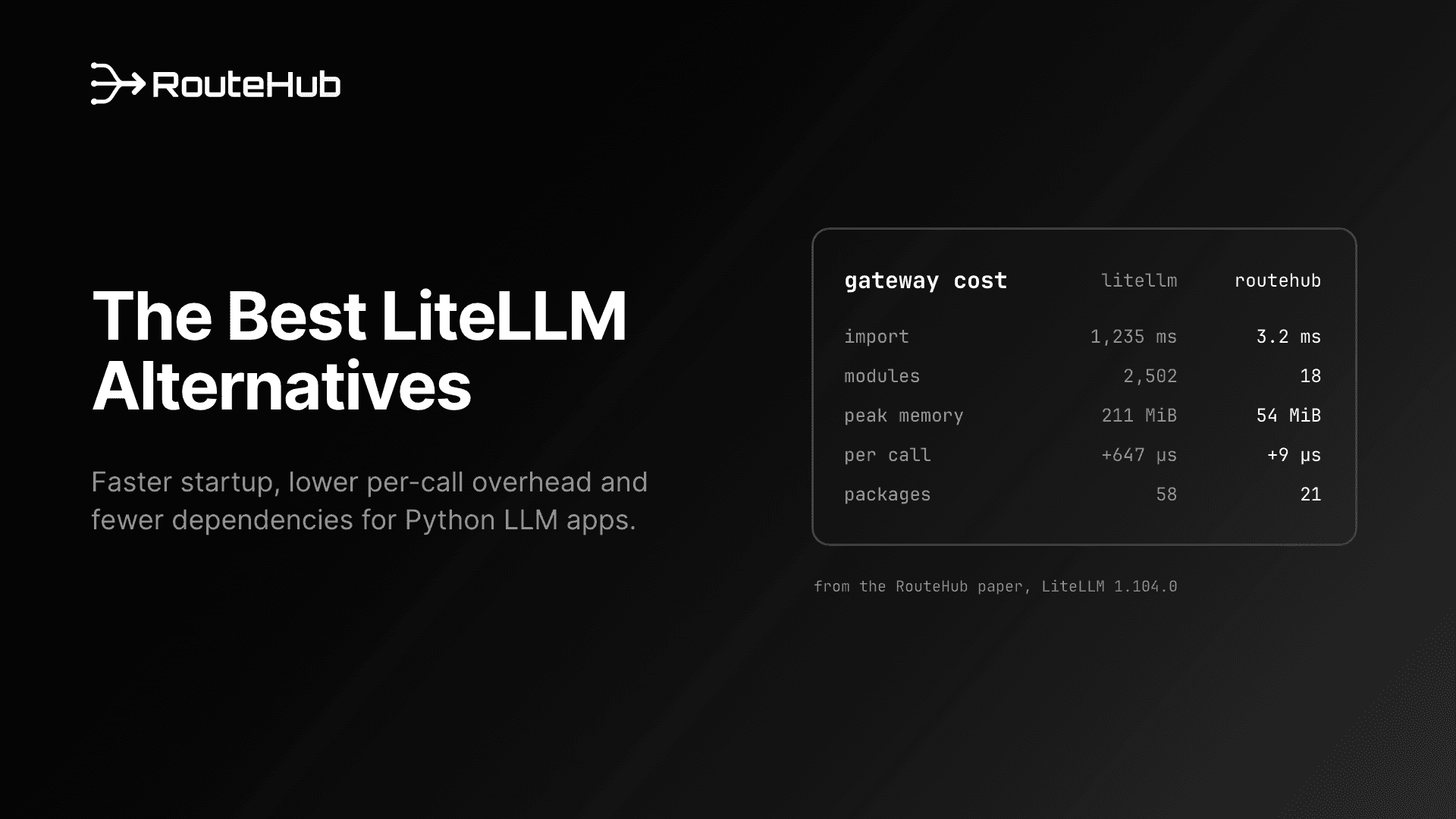
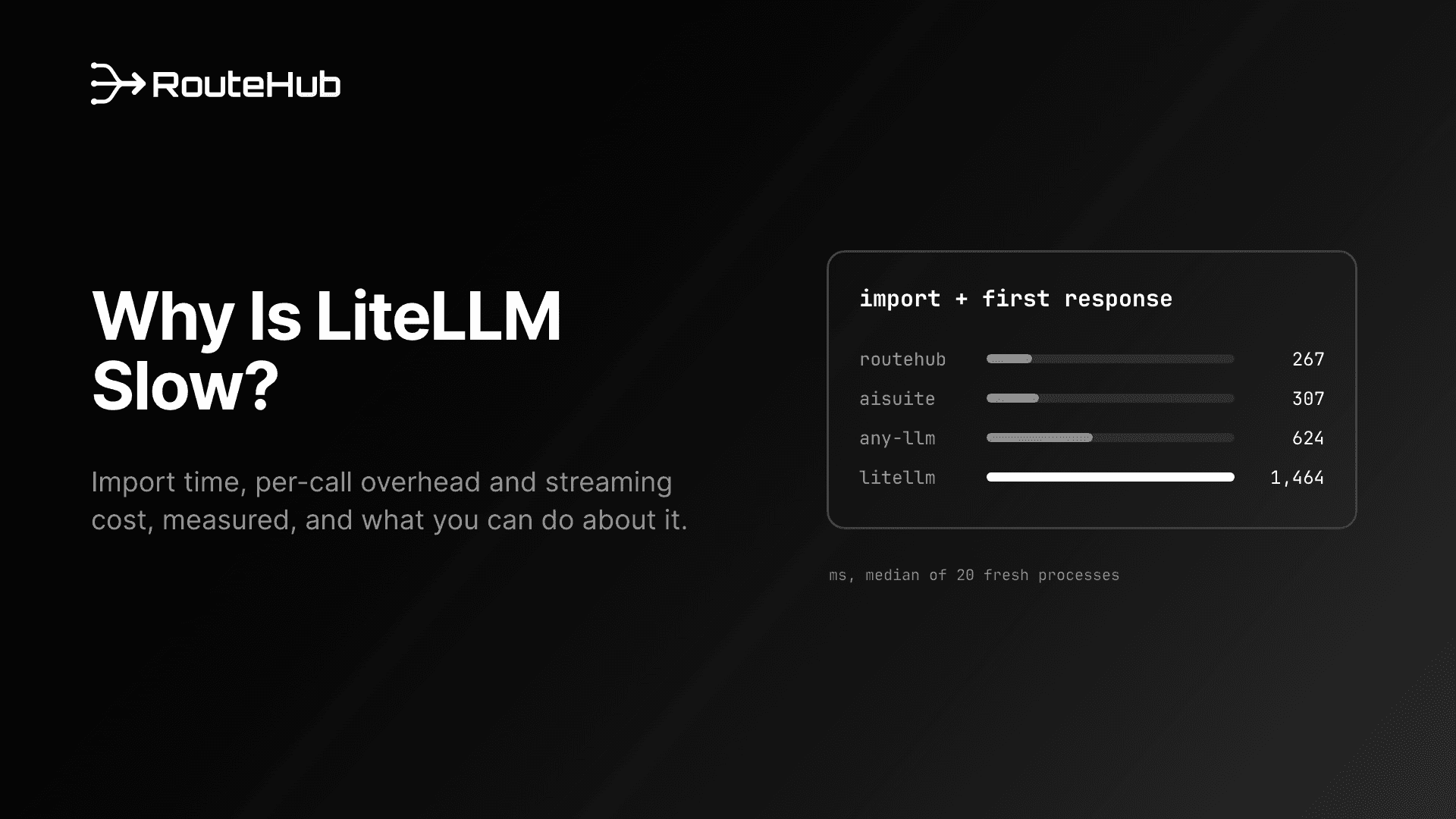
Slow imports. In our benchmark of LiteLLM 1.104.0 (from the RouteHub technical report), import litellm took a median of 1,235 ms and loaded 2,502 modules, including the OpenAI SDK, aiohttp, jinja2, yaml and tokenizers. Every serverless cold start, CLI command, CI test run and worker process pays that before its first line of real work. We cover the causes in detail in Why Is LiteLLM Slow?.
A network call during import. By default, LiteLLM downloads its model price list from GitHub when it is imported, unless you set LITELLM_LOCAL_MODEL_COST_MAP=True. In the same benchmark, that download added another 145 ms to the median import, and it means startup depends on GitHub being reachable.
Per-call overhead. Measured against an instant mock server, LiteLLM added 647 µs to a one-message OpenAI call compared with the bare OpenAI SDK, and 736 µs to a 22-message agent request. Profiling shows where it goes: on every call, LiteLLM creates a logging object, runs cache and response-metadata hooks, converts the reply into its own response type and submits a success handler to a background thread pool. Per request, that came to 4,615 extra Python function calls beyond the SDK's own.
Streaming cost. LiteLLM spent about 224 µs per chunk on the OpenAI route and 261 µs on the Anthropic route, and delivered its first chunk about 15 to 17 ms after the request. At 100 chunks per second, 0.2 ms per chunk is 2% of a CPU core for each open stream. A process with 50 concurrent streams spends a full core on chunk handling alone.
Global settings. Options such as litellm.drop_params, litellm.num_retries, litellm.ssl_verify and litellm.set_verbose are module-level globals. When many agents or tenants share one process, one component's setting changes everyone's behavior.
Dependencies and supply chain. LiteLLM installs 58 packages (168.5 MiB in our clean environment). Every one of them is code that runs with your API keys. On March 24, 2026, two LiteLLM releases on PyPI, 1.82.7 and 1.82.8, were published with a credential stealer after attackers gained access to the project's publishing pipeline. The LiteLLM team traced it to the compromised Trivy scanner in its CI workflow. Version 1.82.8 added a litellm_init.pth file, which Python runs at interpreter startup, so the stealer could fire without LiteLLM ever being imported. The team released a clean 1.83.0 from a rebuilt pipeline. The incident did not reveal a flaw in LiteLLM's code, but it showed how much access a gateway library has and why a smaller dependency tree is worth having.
What Should a LiteLLM Replacement Have?
Before you compare tools, write down what you need. For most Python applications that use LiteLLM as a library, a good LiteLLM replacement has these properties:
- The same call shape. OpenAI-format messages in, OpenAI-format responses out, with streaming, async and tool calling through the same function. Ideally the same function names, so migration is a change of import.
- The providers you use. Check your actual providers against the replacement's list, including Azure, Bedrock and Vertex AI if you use them.
- Native support where it matters. Anthropic's OpenAI-compatible endpoint drops prompt caching, thinking output and cached-token usage. If you use Claude heavily, the replacement should call Claude's native Messages API.
- Low startup and per-call cost. Measure import time, first-call time and overhead per call against the bare provider SDK, which is the floor.
- Per-call configuration. Retries, timeouts and TLS settings as arguments rather than globals.
- Typed errors. Rate limits, context-window errors and authentication failures as distinct exceptions, so retry and fallback logic stays simple.
- A small dependency tree from a maintained project with a permissive license.
If you need budgets, virtual keys, spend dashboards or a shared endpoint for many teams, you need a gateway server instead. The second half of the list below covers those.
The Best LiteLLM Alternatives in 2026
1. RouteHub: a drop-in LiteLLM alternative for Python
RouteHub is an open-source Python library from the Swarms team (Apache 2.0, Python 3.10+). It keeps LiteLLM's function names and module paths (completion, acompletion, embedding, routehub.utils, routehub.exceptions), so most code moves over by changing the import. It reaches more than 20 providers, including OpenAI, Anthropic, Gemini, Azure OpenAI, Groq, xAI, DeepSeek, OpenRouter, Mistral, Together, Fireworks, Ollama, vLLM and any OpenAI-compatible server.
RouteHub is built to cost about as much as the provider SDK it wraps. import routehub loads no third-party code; the OpenAI SDK loads on the first request. OpenAI-compatible providers go through a cached official OpenAI client, and RouteHub returns the SDK's own ChatCompletion objects without re-wrapping them. Claude goes through a native adapter for the Messages API, so prompt caching, extended thinking and cached-token accounting work. Every setting is a per-call argument, errors are typed exceptions that subclass the OpenAI SDK's, and mock_response lets you test without a network call. It has three direct dependencies (openai, pydantic and tiktoken) and installs 21 packages.
Best for: Python applications and agent frameworks that use LiteLLM's SDK functions and want lower startup time, lower per-call overhead and a smaller dependency tree without rewriting call sites. Read the launch post for the design.
Limits: RouteHub is a library only. It has no proxy server, budgets, spend logging, callbacks or router, and LiteLLM-only arguments such as fallbacks, metadata and caching are accepted and ignored. Native Bedrock and Vertex AI adapters are on the roadmap but not shipped. Version 0.2.0 is young compared with LiteLLM.
2. any-llm (Mozilla.ai)
any-llm is a Python library from Mozilla.ai, licensed under Apache 2.0, that gives one interface over many providers and uses each provider's official SDK where one exists. It needs Python 3.11 or newer, and you install provider support through extras such as any-llm-sdk[openai]. Its provider list is long, with more than 50 entries, and includes AWS Bedrock and Google Vertex AI. It offers module-level functions for scripts and an AnyLLM client class, which reuses connections and is the recommended path for production. For budgets, virtual keys and usage tracking, Mozilla.ai has a separate self-hosted gateway, Otari (Python, Apache 2.0).
In our benchmark, any-llm imported in 569 ms because it loads both the OpenAI and Anthropic SDKs up front. Its AnyLLM client added 210 µs per one-message OpenAI call over the bare SDK. Its module-level functions build a new provider client on every call, which cost much more (13.16 ms per call on the Anthropic route), so use the client class.
Best for: teams that want an official-SDK design, broad provider coverage including Bedrock and Vertex AI, and a matching self-hosted gateway from the same team.
3. aisuite
aisuite is an MIT-licensed Python library started by Andrew Ng that wraps provider SDKs behind an OpenAI-style client.chat.completions.create() call. It covers OpenAI, Anthropic, Google, Mistral, Hugging Face, AWS, Cohere, Ollama, OpenRouter and others, and it adds automatic tool execution (max_turns) and MCP support. It loads provider modules only when needed, which gave it a fast 93 ms import in our benchmark, and on the OpenAI route its per-call cost was as low as RouteHub's.
Two things to check before adopting it: the current PyPI release (0.2.0) pins openai below 2.0 for its OpenAI-based providers, and in our benchmark 0.2.0 needed its MCP extra installed before it accepted requests with tools. Its call shape also differs from LiteLLM's, so migration means rewriting call sites.
Best for: scripts, prototypes and teaching code where a simple interface and automatic tool calling matter more than LiteLLM compatibility.
4. Portkey AI Gateway
Portkey's gateway is an MIT-licensed gateway server written in TypeScript. You run it with npx @portkey-ai/gateway (or use Portkey Cloud, the hosted version) and point any OpenAI SDK at it by changing the base URL. It routes to more than 1,600 models and adds fallbacks, automatic retries, load balancing across keys and providers, caching and more than 50 guardrails.
Best for: teams that need a central gateway with guardrails and routing rules, and that are comfortable running a Node.js service or paying for a hosted control plane. It replaces the LiteLLM proxy rather than the LiteLLM library.
5. Bifrost
Bifrost, from Maxim AI, is an Apache 2.0 gateway server written in Go. You can start it with npx -y @maximhq/bifrost or docker run -p 8080:8080 maximhq/bifrost. It supports more than 20 providers and adds failover, load balancing across keys and providers, budgets through virtual keys and teams, semantic caching, Prometheus metrics and MCP tools. Existing OpenAI, Anthropic and Google GenAI SDK code can point at it by changing the base URL, and Go applications can embed its core as a library.
Best for: teams replacing the LiteLLM proxy who want a compiled, self-hosted gateway with budgets and observability built in.
6. OpenRouter
OpenRouter is a hosted API with one key and one OpenAI-compatible endpoint for models from many providers. There is nothing to run. OpenRouter passes through provider prices without markup and charges a 5.5% fee (minimum $0.80) when you buy credits by card, with a bring-your-own-key option. If a provider returns an error, OpenRouter falls back to the next provider for that model.
Best for: teams that want access to many models without managing provider accounts. It also combines with a library: RouteHub, any-llm and aisuite can all call OpenRouter, for example routehub.completion(model="openrouter/anthropic/claude-sonnet-4.6", ...).
LiteLLM Alternatives Compared
| Type | Language | License | How you run it | Best at |
|---|
| RouteHub | Library | Python 3.10+ | Apache 2.0 | In your process | Low-overhead drop-in for LiteLLM's SDK functions |
| any-llm | Library | Python 3.11+ | Apache 2.0 | In your process (Otari for a gateway) | Official SDKs, 50+ providers incl. Bedrock and Vertex AI |
| aisuite | Library | Python | MIT | In your process | Simple interface, automatic tool calling, MCP |
| Portkey Gateway | Gateway server | TypeScript | MIT | Self-hosted or Portkey Cloud | Guardrails, routing, 1,600+ models |
| Bifrost | Gateway server | Go | Apache 2.0 | Self-hosted (npx or Docker) | Budgets, virtual keys, failover, metrics |
| OpenRouter | Hosted API | n/a | Commercial service | Hosted only | Many models behind one key, no infrastructure |
| LiteLLM | Library and proxy | Python | MIT (outside enterprise/) | Both | Widest feature set, 100+ providers |
LiteLLM vs RouteHub: How Much Faster Is RouteHub?
These numbers come from the RouteHub technical report, which tested LiteLLM 1.104.0 with each library in its own environment against an instant mock server on one Apple M3 Pro laptop (Python 3.12). Removing network and model time isolates the work each library does.
| LiteLLM 1.104.0 | RouteHub | Difference |
|---|
import time | 1,235 ms | 3.2 ms | 383x faster |
| Import + first response | 1,464 ms | 267 ms | 5.5x faster |
| Peak memory after first call | 211 MiB | 54 MiB | 3.9x less |
Modules loaded by import | 2,502 | 18 | |
| Overhead per call (OpenAI, 1 message) | +647 µs | +9 µs | |
| Overhead per call (OpenAI, agent request) | +736 µs | +32 µs | |
| Claude call, 1 message | 0.98 ms | 0.26 ms | |
| Per streamed chunk (Anthropic) | 261 µs | 5 µs | |
| Installed packages | 58 | 21 | |
Overhead is measured against the bare OpenAI SDK, which took 0.54 ms per one-message call. On the Anthropic route RouteHub was also faster than the official Anthropic SDK (0.42 ms per call), because its adapter encodes the request once and reads the reply straight into a ChatCompletion.
Over a real network, RouteHub's 60-second keep-alive also matters. After a 10-second pause, like an agent waiting on a slow tool, RouteHub reused its connection and got a response from api.openai.com in 116 ms, while LiteLLM reconnected and took 185 ms.
The RouteHub README also quotes an earlier, simpler measurement against LiteLLM 1.76.1: 5.5 ms against 1,027 ms for import (about 190x) and 0.004 ms against 0.74 ms of overhead per call. Both runs point the same way.
When Should You Stay on LiteLLM?
Switching is not always the right call. Stay on LiteLLM, or keep its proxy alongside a lighter library, if:
- You run the LiteLLM proxy. Budgets, virtual keys, spend logs, team management and an admin UI are not part of RouteHub, any-llm or aisuite. Portkey, Bifrost and Mozilla.ai's Otari cover parts of this, so compare their feature lists with what you actually use.
- You depend on its callbacks or router. Logging integrations, the
Router class, deployment-level fallbacks and cooldowns have no equivalent inside RouteHub.
- You need a provider RouteHub doesn't cover yet. LiteLLM reaches more than 100 providers, including AWS Bedrock and Google Vertex AI. If those two are the only gap, any-llm also covers them.
- You push very high async concurrency from one process. In our throughput test at 128 requests in flight, LiteLLM's aiohttp transport handled 876 requests per second on the OpenAI route against RouteHub's 711, and 942 against 865 on Anthropic. Every httpx-based client, including the bare SDKs, slowed down at that level. An aiohttp option for RouteHub is on the roadmap.
For a single interactive request, the model's own latency dominates whichever library you choose. The differences above matter when they are multiplied by agent steps, process starts or concurrent streams.
How Do You Replace LiteLLM With RouteHub?
Install RouteHub:
pip install routehub
# or
uv add routehub
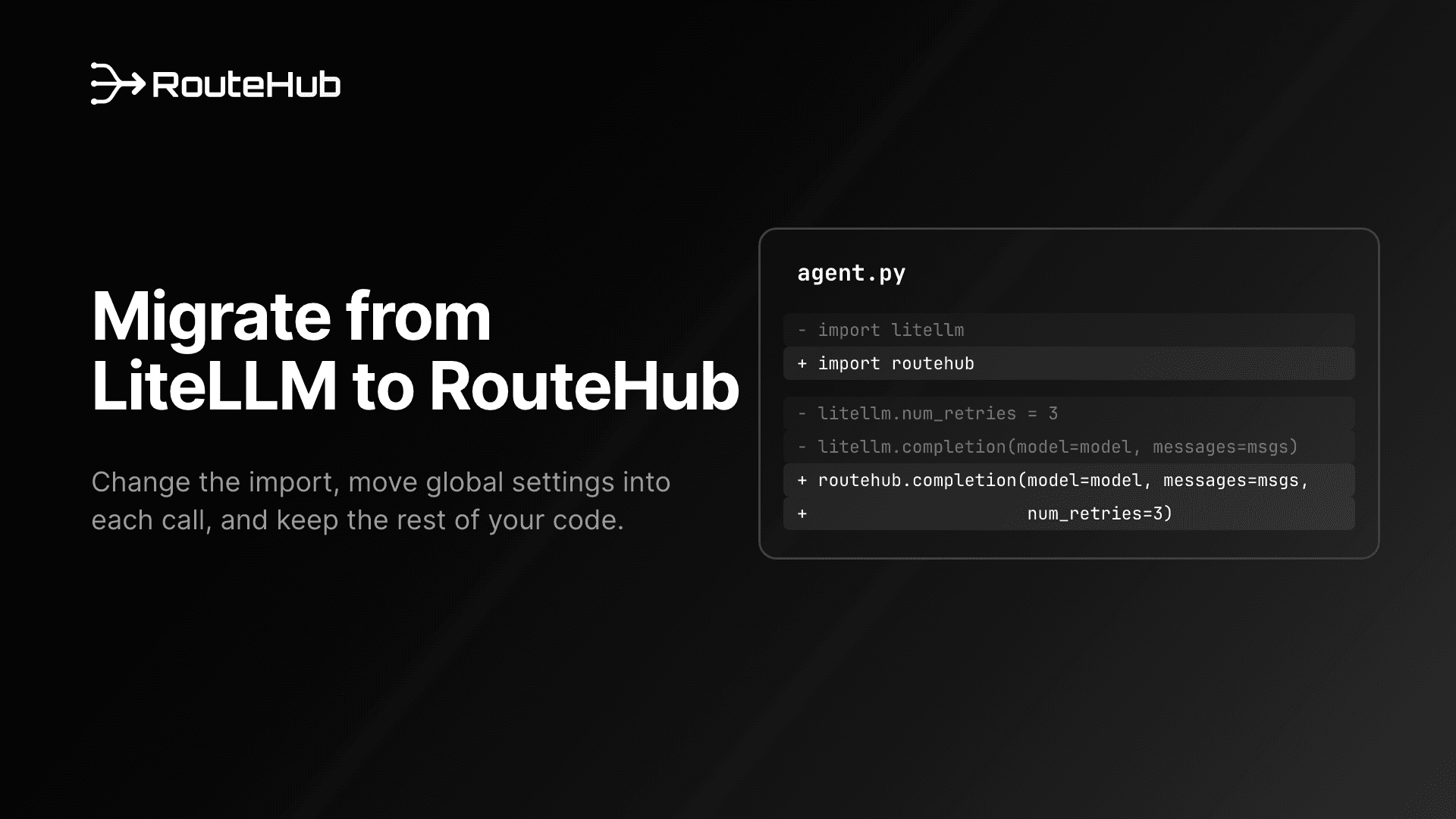
Change the imports. Function names and arguments stay the same:
# Before
from litellm import completion, acompletion
from litellm.exceptions import RateLimitError

# After
from routehub import completion, acompletion
from routehub.exceptions import RateLimitError

response = completion(
    model="claude-sonnet-4-6",
    messages=[{"role": "user", "content": "Summarize our Q3 risks in three bullets."}],
    num_retries=3,
)
print(response.choices[0].message.content)
Move global settings into the call. litellm.drop_params = True becomes completion(..., drop_params=True), and the same applies to num_retries, ssl_verify and set_verbose. Responses are OpenAI SDK objects, so use attribute access (response.choices[0]) or .model_dump() instead of response["choices"]. If your code passes LiteLLM-only arguments such as fallbacks, RouteHub ignores them, so handle fallbacks in your own code by catching its typed exceptions.
The full checklist, including tests, Claude-specific features and common errors, is in How to Migrate From LiteLLM to RouteHub. If you are choosing a gateway from scratch rather than replacing one, see The Best LLM Gateway for Python, and for Claude-specific details read How to Call Claude in OpenAI Format From Python.
Frequently Asked Questions
What is the best LiteLLM alternative for Python?
For applications that use LiteLLM as a library, RouteHub is the closest drop-in LiteLLM alternative: it keeps the same function names and module paths, imports in 3.2 ms against LiteLLM's 1,235 ms, and adds 9 µs per call against LiteLLM's 647 µs in our benchmark. any-llm is a good choice if you prefer Mozilla.ai's official-SDK design, and aisuite suits simple scripts. For a gateway server, look at Portkey or Bifrost.
Is RouteHub a drop-in replacement for LiteLLM?
For the SDK functions, mostly yes. completion, acompletion, embedding, get_model_info, the supports_* helpers and the exception classes have the same names, so most code needs only a new import. The differences: settings are per-call arguments, responses are OpenAI SDK objects without dictionary access, and LiteLLM's proxy, router and callbacks have no equivalent.
Does RouteHub replace the LiteLLM proxy server?
No. RouteHub is a Python library that runs in your process. If you need a shared endpoint with budgets and virtual keys, use a gateway server such as Portkey, Bifrost, Otari or the LiteLLM proxy itself. Your application code can still call that server through RouteHub with api_base=.
Is RouteHub free and open source?
Yes. RouteHub is licensed under Apache 2.0 and published on PyPI. The source, issues and roadmap are on GitHub.
Which LLM providers does RouteHub support?
More than 20, including OpenAI, Anthropic (through the native Messages API), Google Gemini, Azure OpenAI, Groq, xAI, DeepSeek, OpenRouter, Together AI, Mistral, Fireworks, Perplexity, Cerebras, Ollama, LM Studio, vLLM and any OpenAI-compatible server. The README has the full list with model strings and environment variables.
Is LiteLLM safe to use after the March 2026 incident?
The compromised releases were 1.82.7 and 1.82.8, and the LiteLLM team published clean releases from a rebuilt pipeline starting with 1.83.0. If you installed either affected version, follow LiteLLM's guidance and rotate any credentials on that machine. Whatever library you use, pin versions and keep your dependency tree small.