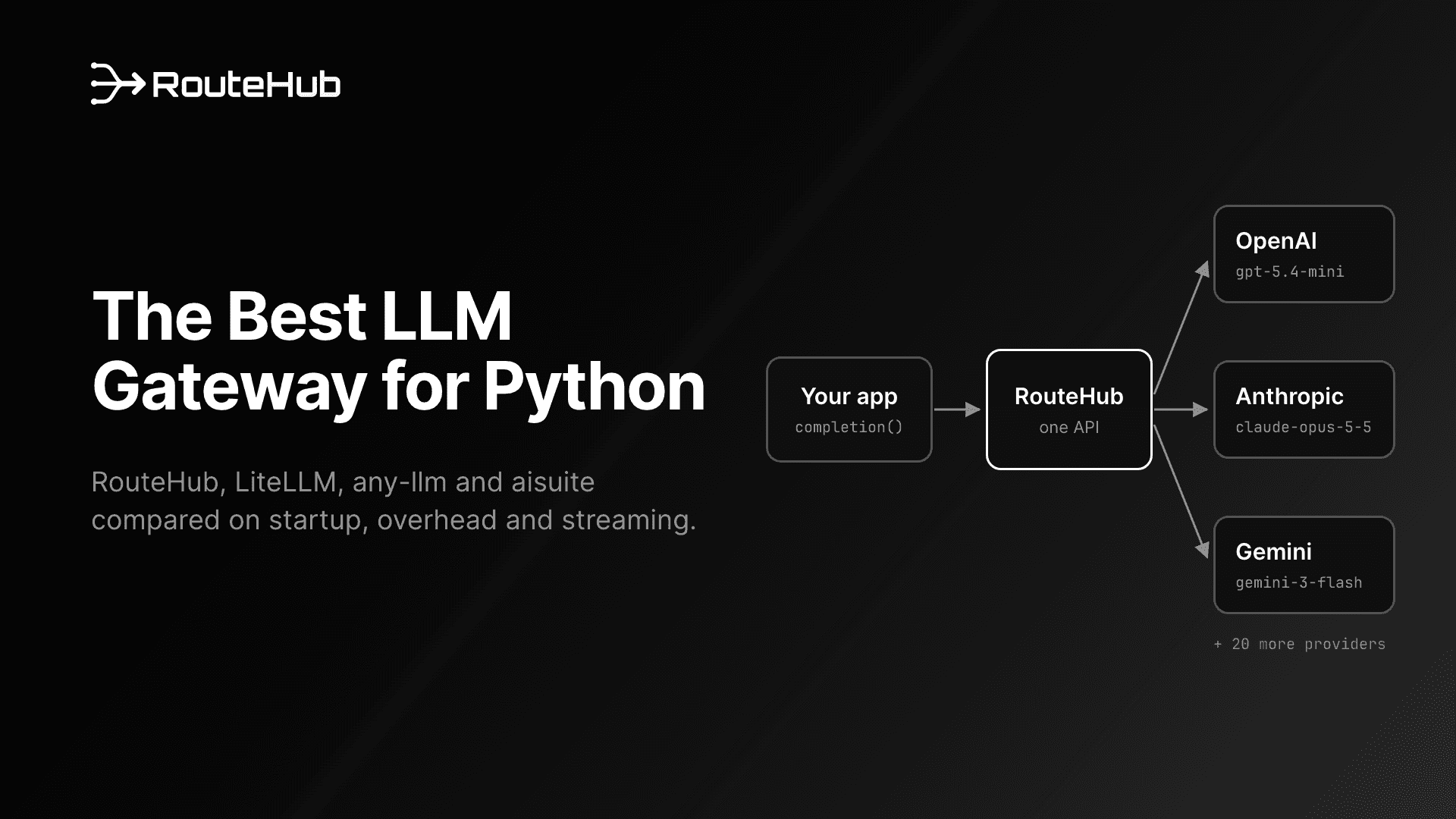
Picking the best LLM gateway for Python means picking the library that sits between your code and every model provider you call. That library decides how fast your process starts, how much time each request spends in client code, whether Claude features like prompt caching survive the trip, and how many packages run with your API keys. This guide compares four Python LLM gateway libraries, RouteHub, LiteLLM, any-llm and aisuite, and explains when you need a proxy server instead of a library.
A note before we start: we build RouteHub. Every benchmark number below comes from our technical report, where each library ran in its own environment against the same mock server, and we say plainly where the other libraries do better. Facts about the other projects come from their own repositories and documentation, linked as we go.
Best LLM Gateway for Python: The Short Answer
- Lowest overhead for a Python app or agent: RouteHub. It imports in 3.2 ms, adds 9 µs to a bare OpenAI SDK call, and is faster than the official Anthropic SDK on Claude calls and streams.
- A central proxy with virtual keys, spend tracking, guardrails and 100+ providers: LiteLLM, deployed as the LiteLLM Proxy.
- A library from Mozilla.ai built on the official provider SDKs: any-llm, using its
AnyLLM client in production.
- A small install with an agents API on top: aisuite, as long as you can stay on the
openai 1.x line.
- One hosted API key for hundreds of models: OpenRouter, which you can also call through any of the libraries above.
The rest of this article explains how we got there.
What Is an LLM Gateway?
An LLM gateway gives your application one way to call many model providers. You write a request once, usually in the OpenAI Chat Completions format, and the gateway sends it to OpenAI, Anthropic, Gemini, Groq, Mistral, a local Ollama server or whichever provider the model string names. Responses, streamed chunks, tool calls, token usage and errors come back in one shape, so the rest of your code does not need to know which provider answered.
Gateways come in two forms:
- Library gateways are Python packages you import. RouteHub, the LiteLLM Python SDK, any-llm and aisuite are all libraries. Each request goes straight from your process to the provider.
- Proxy gateways are servers your code sends requests to, such as the LiteLLM Proxy, Portkey's AI Gateway or a hosted service like OpenRouter. The proxy then calls the provider for you.
People also call this a unified LLM API for Python or a multi-provider LLM client. The idea is the same: one call signature, many providers.
Why Do Python Apps and Agents Use an LLM Gateway?
Most teams start with one provider's SDK and add a gateway when they need a second provider. A gateway lets you:
- Switch models by changing a string, for example from
gpt-5.4-mini to claude-sonnet-4-6, without touching the code around the call.
- Fall back to another provider when one is rate limited or down.
- Compare models on the same prompts with the same code.
- Track usage and cost in one format across providers.
- Handle errors once, with one set of exception types for rate limits, context overflows and authentication failures.
Agents raise the stakes, because a gateway's own costs repeat. An agent alternates model calls and tool calls for tens or hundreds of steps, so per-call overhead is paid at every step. Serverless functions, CLI tools, test suites and per-task workers pay the gateway's import time on every start. Multi-agent systems send many requests at once, so the CPU spent per request and per streamed chunk limits how much one process can handle. For a single chat message these costs are small next to model latency. Across an agent run they add up, which is why they feature heavily in the comparison below. We go deeper on this in why LiteLLM is slow to import.
Library Gateway or Proxy: Which Kind Do You Need?
A proxy makes sense when many applications or teams share model access and you want one place to manage it:
- LiteLLM Proxy is LiteLLM's self-hosted AI gateway server. Its README lists virtual keys, spend tracking, guardrails, load balancing and an admin dashboard, and it exposes models in the OpenAI format.
- Portkey AI Gateway is an open-source (MIT) gateway written in TypeScript. You can start it with
npx @portkey-ai/gateway or Docker, and it offers automatic retries, fallbacks, load balancing, conditional routing, guardrails and caching. Portkey also runs a hosted version.
- OpenRouter is a hosted service that gives you hundreds of models through one OpenAI-compatible endpoint and one API key, and it handles provider fallbacks for you.
A proxy adds a network hop to every request, and a self-hosted one is another service to deploy and monitor. A library adds no hop and nothing to run. The two also combine well: RouteHub can call OpenRouter with an openrouter/ model prefix, and it can point at any OpenAI-compatible server, a LiteLLM Proxy included, with api_base=.
The rest of this guide compares library gateways, since that is the choice every Python application makes either way.
What Makes the Best LLM Gateway for Python?
These are the criteria that separate the libraries in practice:
- Cold start. How long
import takes, and how long until the first response in a fresh process.
- Per-call overhead. How much time the gateway adds to each request on top of the provider SDK.
- Streaming cost. How much CPU each streamed chunk costs. With many concurrent streams, this decides how many cores go to bookkeeping.
- Async throughput. How many requests per second one process can push through the gateway at different concurrency levels.
- Provider coverage. Whether every provider you need today, and the ones you may need next year, are supported.
- Native Claude features. Anthropic's OpenAI-compatible endpoint does not support prompt caching, does not return thinking output and leaves cached-token details empty. A gateway that calls the native Messages API keeps them. See how to call Claude in OpenAI format from Python for details.
- Dependency footprint. Every installed package is code that runs with your API keys. In March 2026, LiteLLM versions 1.82.7 and 1.82.8 on PyPI were found to contain credential-stealing malware; LiteLLM removed them and published an advisory. A smaller dependency tree is a smaller target.
- Typed errors. Whether failures arrive as specific exception classes you can catch.
- Global or per-call configuration. Module-level settings, such as
litellm.drop_params or litellm.ssl_verify in LiteLLM, affect every caller in the process. Per-call settings, which is all RouteHub offers, keep tenants and agents isolated.
- Response types. Whether you get the OpenAI SDK's own objects, a subclass of them, or a separate type that looks similar.
The Four Python LLM Gateway Libraries
RouteHub
RouteHub is the gateway we built for the Swarms agent framework. It keeps LiteLLM's function names and module paths (completion, acompletion, embedding, routehub.utils, routehub.exceptions), so moving over is mostly a change of import. It sends requests to OpenAI-compatible providers through the official OpenAI SDK and returns the SDK's own ChatCompletion objects unchanged. For Claude, it calls Anthropic's native Messages API through its own adapter, so prompt caching, thinking and cached-token accounting all work. It loads nothing at import, makes no network calls until a request does, keeps HTTP connections alive for 60 seconds across agent steps, and takes every setting as an argument to the call. It has three direct dependencies: openai, pydantic and tiktoken.
LiteLLM
LiteLLM, from BerriAI, covers 100+ providers, ships both a Python SDK and the LiteLLM Proxy server, and adds cost tracking, guardrails, load balancing and logging. Many of its settings are module globals such as litellm.drop_params and litellm.num_retries, and it returns its own ModelResponse type. LiteLLM's README now also describes a Rust core and a separate litellm-core distribution of the Python SDK whose release integration is still pending, so newer releases may perform differently from the version we measured.
any-llm
any-llm, from Mozilla.ai, sends requests through each provider's official SDK. It offers module-level functions such as completion(), which build a new client per call, and an AnyLLM class, which reuses its client and is the approach its README recommends for production. Model strings look like openai:gpt-4o, or you pass provider= separately. Its response types subclass the OpenAI SDK's types. For budgets, key management and analytics, Mozilla.ai points to a separate project, the Otari gateway. any-llm requires Python 3.11 or newer.
aisuite
aisuite is a lightweight library hosted under Andrew Ng's GitHub account. It has two layers: a unified Chat Completions API (client.chat.completions.create with model strings such as anthropic:claude-3-5-sonnet-20240620) and an Agents API with tools, toolkits and MCP support. Provider SDKs are installed as extras, and its openai extra requires openai<2.0.0, which can conflict with other packages that need the current SDK. It returns its own ChatCompletionResponse class shaped like OpenAI's.
Side by side
| RouteHub | LiteLLM | any-llm | aisuite |
|---|
| Maintainer | The Swarm Corporation | BerriAI | Mozilla.ai | andrewyng/aisuite |
| License | Apache 2.0 | MIT (outside its enterprise/ folder) | Apache 2.0 | MIT |
| Python | 3.10+ | 3.10+ | 3.11+ | 3.10+ |
| Model string | groq/llama-3.3-70b-versatile | openai/gpt-4o | openai:gpt-4o | openai:gpt-4o |
| Providers | 20+ | 100+ | Many, via official SDKs | OpenAI, Anthropic, Google, Mistral, AWS, Ollama and more |
| Response type | OpenAI SDK's ChatCompletion | LiteLLM ModelResponse | Subclasses of OpenAI SDK types | aisuite ChatCompletionResponse |
| Proxy server | No | LiteLLM Proxy | Separate project (Otari) | No |
Benchmarks: How Fast Is Each Python LLM Gateway?
The numbers below come from the RouteHub technical report. We tested RouteHub, LiteLLM 1.104.0, any-llm 1.30.0 and aisuite 0.2.0, plus the bare OpenAI and Anthropic SDKs as a floor. Each library ran in its own virtual environment, because their version pins conflict, and every measurement ran in a fresh process with no API keys or proxies set. Requests went to a mock server on the same machine that answers instantly, so the numbers measure client-side work only. LiteLLM's GitHub price-list download was turned off to give it its best case. Everything ran on one Apple M3 Pro laptop with Python 3.12. Since then, LiteLLM has reached 1.104.2 and any-llm 1.33.0 on PyPI, so treat these as a snapshot of the versions tested.
Cold start and memory
| Library | Import | Import + first response | Peak memory |
|---|
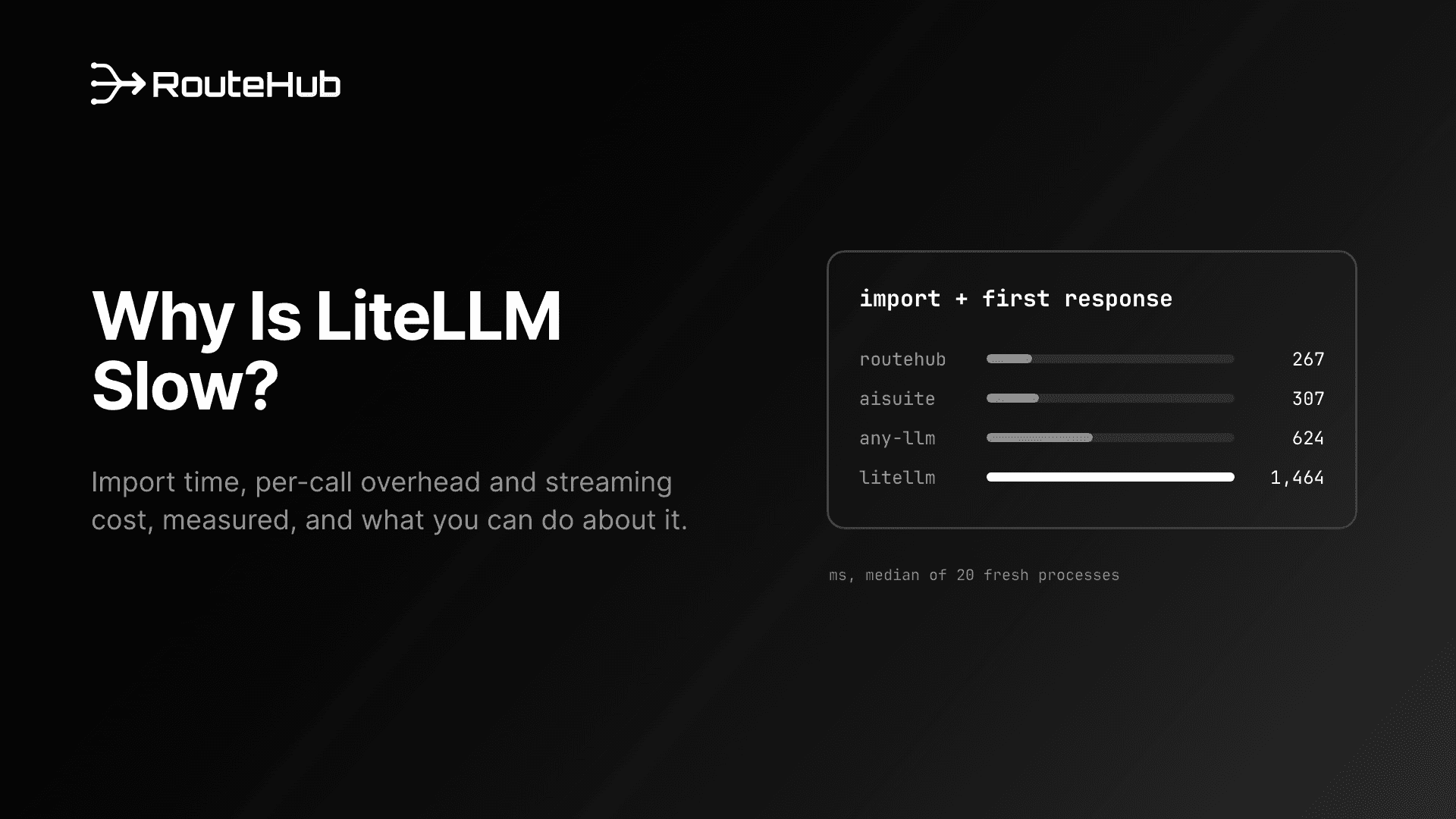
| RouteHub | 3.2 ms | 267 ms | 54 MiB |
| OpenAI SDK (bare) | 217 ms | 258 ms | 53 MiB |
| aisuite | 93 ms | 307 ms | 59 MiB |
| any-llm (functions) | 569 ms | 624 ms | 87 MiB |
| LiteLLM | 1,235 ms | 1,464 ms | 211 MiB |
RouteHub imports 383x faster than LiteLLM and reaches its first response 5.5x sooner, within 9 ms of the bare OpenAI SDK, with 3.9x less peak memory. RouteHub defers loading the OpenAI SDK until the first request, which is why import plus first response is the fair comparison.
Per-call overhead
Median latency of warm, sequential calls in milliseconds (1,200 calls each). The agent request has 22 messages and four tools.
| Library | OpenAI, 1 message | OpenAI, agent | Anthropic, 1 message | Anthropic, agent |
|---|
| Provider SDK (bare) | 0.54 | 2.04 | 0.42 | 0.45 |
| RouteHub | 0.55 | 2.08 | 0.26 | 0.29 |
| aisuite | 0.51 | 2.08 | 0.46 | 1.25 |
| any-llm (AnyLLM client) | 0.75 | 2.40 | 0.69 | 1.48 |
| any-llm (functions) | 1.58 | 3.20 | 13.16 | 11.99 |
| LiteLLM | 1.19 | 2.78 | 0.98 | 1.12 |
On the OpenAI route, aisuite and RouteHub are both close to the bare SDK. LiteLLM adds 647 µs per call and any-llm's client 210 µs. On the Anthropic route, RouteHub is faster than the Anthropic SDK itself, because its adapter encodes the request once and reads the reply straight into a ChatCompletion. any-llm's module-level functions build a new client on every call, which is expensive on the Anthropic route; its AnyLLM client avoids that.
Streaming
Time to consume a 200-chunk stream in milliseconds (medians of 200 streams):
| Library | OpenAI, first chunk | OpenAI, full stream | Anthropic, first chunk | Anthropic, full stream |
|---|
| Provider SDK (bare) | 1.00 | 9.8 | 0.41 | 2.4 |
| RouteHub | 0.82 | 9.1 | 0.29 | 1.2 |
| aisuite | 0.68 | 8.1 | 0.49 | 3.0 |
| any-llm (AnyLLM client) | 7.42 | 11.8 | 7.36 | 9.9 |
| LiteLLM | 16.61 | 61.1 | 14.69 | 66.6 |
aisuite is the quickest on the OpenAI route here. On the Anthropic route, RouteHub finishes a stream in half the time of the Anthropic SDK (5 µs per chunk against 10 µs). LiteLLM spends 224 to 261 µs per chunk.
Async throughput
Requests per second from one process (1,000 requests per point, 1-message requests). Each point is a single run, and the report advises against ranking results within about 10% of each other.
| Library | OpenAI, 1 in flight | OpenAI, 128 in flight | Anthropic, 1 in flight | Anthropic, 128 in flight |
|---|
| Provider SDK (bare) | 1,492 | 812 | 1,711 | 763 |
| RouteHub | 1,295 | 711 | 2,435 | 865 |
| aisuite | 1,308 | 215 | 1,304 | 1,152 |
| any-llm (AnyLLM client) | 1,445 | 665 | 1,301 | 190 |
| LiteLLM | 792 | 876 | 907 | 942 |
This is where other libraries win. At 128 requests in flight, LiteLLM's aiohttp-based transport leads on the OpenAI route, and aisuite leads on the Anthropic route. Every httpx-based client slows down at high concurrency, the bare SDKs included, so the limit there is the HTTP library rather than the gateway's own code. If one process of yours keeps more than 100 requests in flight, measure with your own workload before choosing.
Dependency footprint
A clean environment with each library and the extras needed for OpenAI and Anthropic:
| Library | Installed packages | Size on disk | .py files |
|---|
| aisuite | 19 | 16.7 MiB | 2,539 |
| RouteHub | 21 | 22.9 MiB | 2,271 |
| any-llm | 26 | 28.0 MiB | 4,198 |
| LiteLLM | 58 | 168.5 MiB | 5,140 |
aisuite installs the fewest packages. RouteHub is close behind, and LiteLLM installs nearly three times as many, including boto3, huggingface_hub, tokenizers, aiohttp and jinja2.
Which Python LLM Gateway Should You Pick?
There is no single winner for every case. Here is how we would choose:
- You run agents, serverless functions or other short-lived processes. Choose RouteHub. Cold start and per-call overhead are where it leads by the widest margin, and its 60-second keep-alive saves a TCP and TLS handshake on every step that follows a tool call longer than five seconds (67 ms per step in the report's real-network test).
- You use Claude heavily. Choose RouteHub, which is faster than the official Anthropic SDK in our tests and keeps prompt caching, thinking and cached-token usage. If Claude is the only model you call, the official Anthropic SDK is also a fine choice.
- You need a shared proxy with keys, budgets and a dashboard. Choose the LiteLLM Proxy, or Portkey's gateway. These are features RouteHub does not try to offer.
- You need a provider RouteHub does not cover natively, such as Amazon Bedrock or Google Vertex AI. Choose LiteLLM, which lists both. Native Bedrock and Vertex adapters are on RouteHub's roadmap but not shipped.
- You run more than 100 concurrent requests from one process. Measure first. In our run, LiteLLM led on the OpenAI route and aisuite on the Anthropic route at that level.
- You want the smallest install and an agents API, and
openai 1.x is fine. Choose aisuite.
- You want a Mozilla.ai project built on official SDKs and run Python 3.11 or newer. Choose any-llm, and use the
AnyLLM client rather than the module-level functions.
- You only ever call one provider. Use that provider's SDK directly. A gateway pays off when you call two or more.
If you are already on LiteLLM and want to see what a switch involves, our LiteLLM alternative guide and step-by-step migration guide cover it.
How to Get Started With RouteHub
Install RouteHub from PyPI:
pip install routehub

# Or with uv
uv add routehub

# With orjson for faster JSON handling
pip install "routehub[fast]"
Set a provider key and make a call:
import routehub

messages = [{"role": "user", "content": "Summarize our Q3 risks in three bullets."}]

response = routehub.completion(model="gpt-5.4-mini", messages=messages)
print(response.choices[0].message.content)
Change the model string to change providers. Settings such as retries and timeouts are arguments to the call:
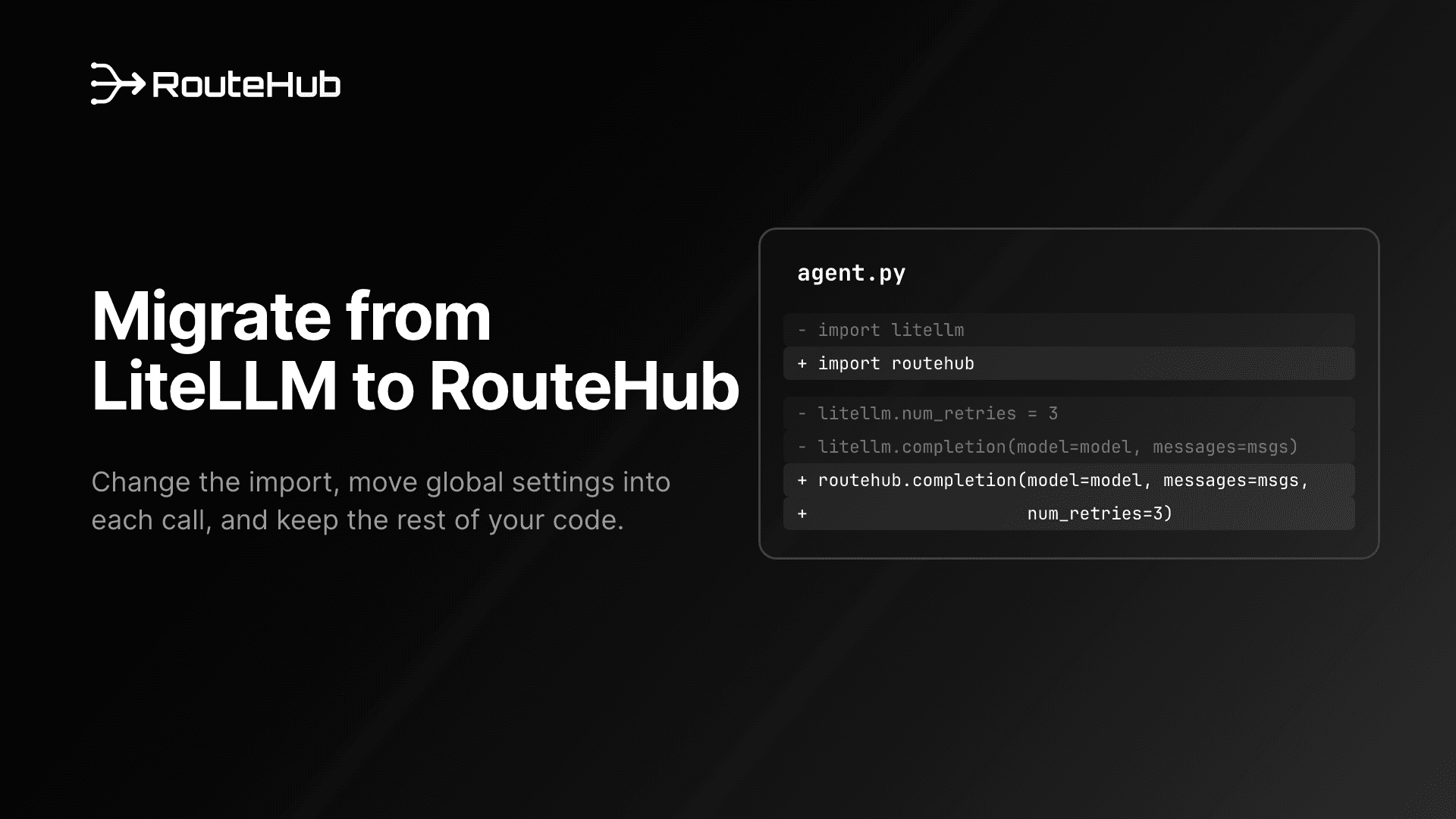
routehub.completion(model="claude-sonnet-4-6", messages=messages, num_retries=3)
routehub.completion(model="gemini/gemini-3-flash-preview", messages=messages)
routehub.completion(model="openrouter/anthropic/claude-sonnet-4.6", messages=messages)
Streaming and async use the same function names:
import asyncio

for chunk in routehub.completion(model="claude-sonnet-4-6", messages=messages, stream=True):
    print(chunk.choices[0].delta.content or "", end="")

response = asyncio.run(
    routehub.acompletion(model="groq/llama-3.3-70b-versatile", messages=messages)
)
Errors arrive as typed exceptions that subclass the OpenAI SDK's own, so existing except openai.RateLimitError handlers keep working:
try:
    routehub.completion(model="gpt-5.4-mini", messages=messages, num_retries=3)
except routehub.RateLimitError as error:
    print(error.status_code, error.llm_provider, error.model)
For tests, mock_response returns a real ChatCompletion (or a stream) without a network call or an API key:
response = routehub.completion(model="gpt-5.4-mini", messages=messages, mock_response="Approved.")
print(response.choices[0].message.content)  # Approved.
The announcement post explains how RouteHub works in more detail, and the README covers every provider and option.
Frequently Asked Questions
What is the best LLM gateway for Python?
It depends on what you need from it. For the lowest startup time and per-call overhead in a Python application or agent, RouteHub measured best in our benchmarks. For a shared proxy with virtual keys, budgets and 100+ providers, LiteLLM is the more complete option. aisuite has the smallest install, and any-llm is a good fit if you want official SDKs underneath and run Python 3.11 or newer.
Is RouteHub a drop-in replacement for LiteLLM?
For most code it is close. RouteHub uses the same function names and module paths, so the main change is the import. Two differences to plan for: settings are arguments to each call instead of module globals, and responses are OpenAI SDK objects, so you read them with attributes rather than dictionary keys. The migration guide walks through it.
Do I need an LLM proxy server or a Python library?
Use a library when one application calls the models and you want the fewest moving parts. Use a proxy such as the LiteLLM Proxy, Portkey or OpenRouter when several applications or teams share model access and you need central keys, budgets or logs. You can also use both: a library like RouteHub can send its requests to an OpenAI-compatible proxy.
Which Python LLM gateway keeps Claude prompt caching and thinking?
RouteHub calls Anthropic's native Messages API, so cache_control markers, extended thinking, signed thinking blocks and cached-token usage all come through. If you call Claude through Anthropic's OpenAI-compatible endpoint instead, Anthropic's documentation says prompt caching is not supported there and that Claude's thinking is not returned.
How much faster is RouteHub than LiteLLM?
In the RouteHub technical report, measured against LiteLLM 1.104.0, RouteHub imports 383x faster (3.2 ms against 1,235 ms), reaches its first response 5.5x sooner, uses 3.9x less peak memory, and adds 9 µs per call on the OpenAI route where LiteLLM adds 647 µs. LiteLLM is faster at 128 concurrent async requests on the OpenAI route.
Does RouteHub support streaming, async and tool calling?
Yes. completion and acompletion take the same arguments, and both handle streaming, tool calling, structured output and reasoning settings, with the same call shape across providers. RouteHub is open source under Apache 2.0 on GitHub.